
Handling the "in progress" Status When Checking an Order via API
What processing Means in an API Response
The processing, in_progress, or other equivalent state means that the provider has accepted the order for processing but has not recorded a final result. For promotion services, this may be link verification, waiting in a queue, launching a task, or gradually delivering the ordered volume.
Processing does not confirm successful completion and does not mean an error. After it, the order may move to completed, partial, canceled, or failed. While the provider returns an intermediate status, do not create a repeat request for the same link and the same volume.
HTTP 200 with a processing status means a successful API response, not successful order completion. These events must be stored and handled separately.
What Data Is Needed to Check an Order
For polling, you need the external order ID that the provider returned at creation. Save it together with the internal ID, the original volume, the service parameters, the link, the creation time, and the original API response. Searching for an order by channel name, link, or volume is unreliable: such values may match several requests.
If a timeout occurs after creation, do not resend the request automatically. The provider may have accepted the request, and the response may have been lost along the way. First use the order lookup method if it is available in the documentation, or pass the case for review.
The drawback of storing only the current status is that in a dispute it is impossible to reconstruct when the order moved to processing, whether there was progress, and what responses arrived earlier.
Example Status Request via curl
Take the exact URL, authorization method, and field names from the provider's documentation. Below is a template: the values in angle brackets must be replaced with data from the specific API.
GET Request for a Single Order
curl -X GET "https://
-H "Authorization: Bearer
-H "Accept: application/json"
Example response:
{
"order_id": "
"status": "processing",
"completed_quantity": 250,
"remains": 750,
"updated_at": "time_value"
}
The completed_quantity and remains fields are shown only as an example structure. The provider may use progress, start_count, balance, or other names. The drawback of the GET approach is that some APIs accept status checks only via POST.
Example POST Request and Batch Check
POST Request for a Single Order Status
curl -X POST "https://
-H "Authorization: Bearer
-H "Content-Type: application/json" \
-d '{"order_id":"
Do not pass the API key in the URL string. Request URLs end up in proxy logs, analytics systems, browser history, and technical logs. The drawback of POST is that it is harder to check manually via the address bar, but that is not a reason to move the secret into the URL.
Batch Request for Active Orders
If the API supports batch checking, send several IDs in one request:
curl -X POST "https://
-H "Authorization: Bearer
-H "Content-Type: application/json" \
-d '{"order_ids":["
Match the response to the internal order by external ID, not by the item's position in the array. The drawback of batch checking: the provider may not return all orders, may limit the list size, or may report an error for only one ID.
How to Schedule Polling for processing
After the first processing response, queue the next check. Choose the interval based on the API documentation, rate limits, and the nature of the service. For tasks where the status changes quickly, more frequent checking at the start is acceptable. For gradual promotion, constant short requests usually do not yield new information.
A practical approach is to increase the pause after identical processing responses. The first check runs after the initial delay, then the interval grows up to a set maximum. If the API returns progress or a new update time, you can start counting from that change.
- After creating an order, do not check the status many times in a row immediately: the service may need time to queue it.
- With repeated processing, increase the interval between requests rather than keeping a constant frequency.
- Add a small random jitter to task start times so orders do not poll the API simultaneously.
- If the provider sends Retry-After or a similar recommendation, use it as the priority.
- For orders with webhooks, keep a control polling: a notification may not arrive.
The drawback of infrequent polling is that the interface may show an old status after actual completion. The drawback of too-frequent polling is the risk of hitting API limits, getting 429, and creating unnecessary load.
Which Times to Store for processing Control
To distinguish normal processing from a hang, one current status is not enough. For each active order, store the creation time, the first processing receipt, the last successful API response, the last change of the external status, and the last change of progress.
It is also useful to save the original volume, the confirmed completed volume, the remainder, and the provider's original status. If the API does not return progress, that is not a reason to consider the order stuck: rely on the time of the last response and the expected processing period if it is specified in the service terms.
The maximum waiting time cannot be set as a single number for all services. Use the period that the provider specifies for the specific service, with an internal buffer for queueing and data updates. If no period is specified, set a separate rule for each service category and review it based on the history of actual processing.
What to Do If processing Does Not Change
Long processing does not prove an error. First check whether successful API responses arrived, whether completed_quantity or remains changed, whether there were webhooks, and whether the service rules changed. The absence of visible growth may be due to a delay in the platform's statistics or to the provider updating progress only at the end.
When the internal waiting period is exceeded, do not cancel the order automatically. Perform an unscheduled status check, request data via a separate method if one is provided, and check the notification history. If the provider still confirms processing, move the order to an internal "needs review" state, but keep the external status without substituting it.
- Record the time of the last confirmed response and the entire API response.
- Check whether progress has changed since the previous poll.
- Reduce the frequency of automatic requests after reaching the internal threshold.
- Provide support with the external ID, link, service parameters, status history, and technical errors.
- Do not restart the remainder until the provider responds or there is an explicit final status.
The drawback of manual checking is that the order requires support attention. But automatic cancellation or duplication is more dangerous: processing may continue at the provider.
How to Separate a Request Failure from the Order Status
A network error, timeout, HTTP 429, and a 5xx response do not report the state of the order itself. They only mean that a new reliable status could not be obtained. In such a situation, keep the last confirmed status, record the technical error, and schedule a new check.
For 429, take Retry-After into account if the header is provided. For temporary network errors and 5xx, increase the pause between attempts. For an authorization, signature, or access rights error, do not set frequent retries: you need to check the key, token expiration, IP restrictions, and access settings.
If the API returned HTTP 200 but the JSON does not parse or the response has no order_id and status, save the response body in full and mark the check as invalid. Do not replace a missing status with completed, canceled, or processing.
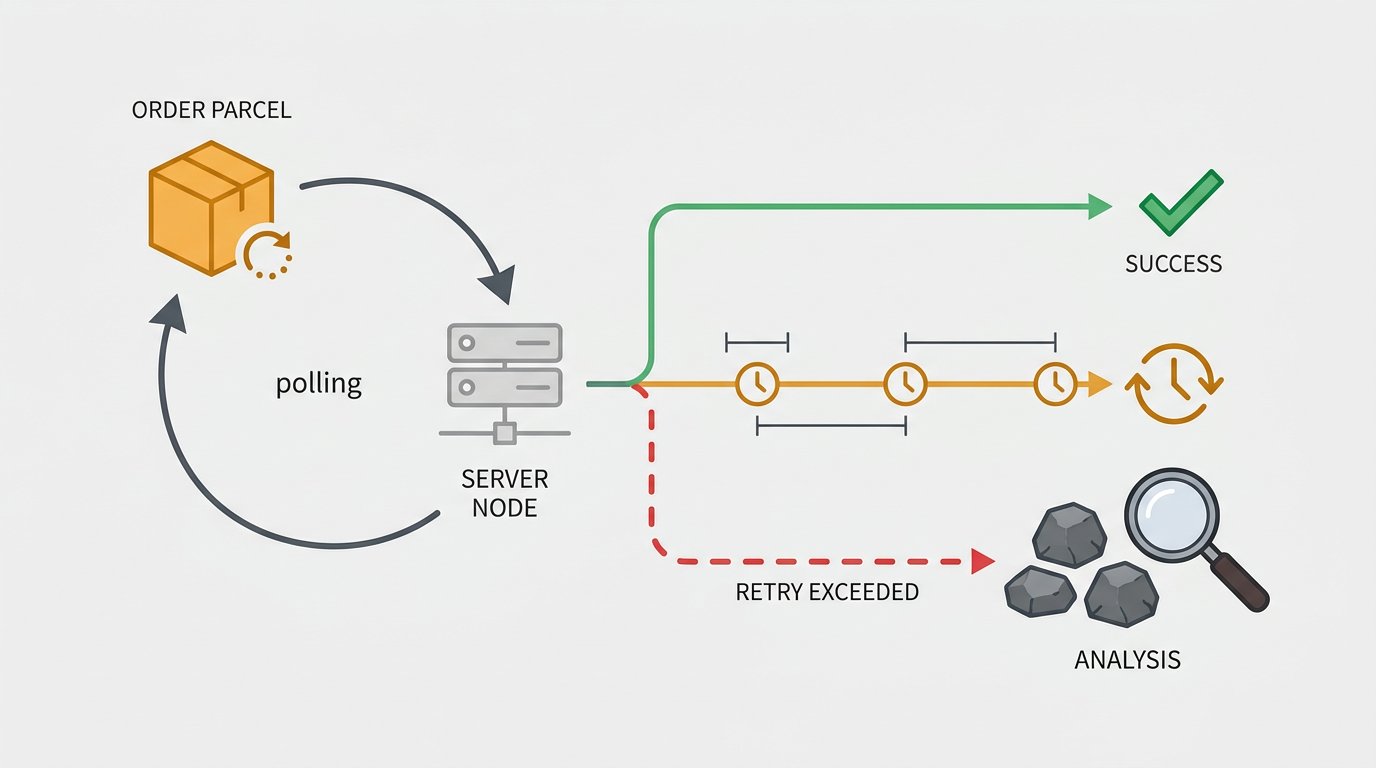
When to Stop Automatic Repeat Requests
Polling should not be infinite. Limit the number of technical retries for temporary errors and separately control the total time an order stays in processing. After the retry limit is exhausted, move the check task to a review queue rather than creating new requests every minute with no result.
Repeating a status request is usually safe if the method only reads data. Creation, cancellation, top-up, restart, and refund methods must not be repeated mechanically after a timeout. Without an idempotency key or explicit provider confirmation, such a repeat may change the order twice.
The drawback of limiting retries is that some updates become a manual task. Infinite retries are worse: they mask a failure, consume limits, and complicate log analysis.
How to Accept the Final Status After processing
Do not allow a reverse transition from completed to processing due to a late polling response or an old webhook. On each update, compare the event time from the provider, the version sequence number if one exists, and the current internal state.
- new and pending may move to processing, canceled, or failed.
- processing may move to completed, partial, canceled, or failed.
- partial should not be automatically treated as completed.
- completed, canceled, and failed are usually considered final and block automatic rollback.
- An unknown status or an invalid transition requires a separate check.
A rigid transition table also has a drawback: the provider may add a valid new state. Therefore, keep the original status and do not overwrite it with your internal classification.
How to Handle partial and the Order Remainder
Partial means that only part of the original volume is confirmed. The API response may include the actually completed quantity, the remainder, the reason, and compensation data. Store these values separately: the original order volume must not be replaced with the completed quantity.
An example final response may look like this:
{
"order_id": "
"status": "partial",
"completed_quantity": 700,
"remains": 300,
"refund": "value_or_absence_of_field"
}
First determine what exactly the API confirms: whether the refund has already been processed, whether the refund is only scheduled, whether the remainder has been canceled, or whether a support request is required. If there is no refund field, do not consider the remainder compensated automatically.
Do not restart the unfulfilled part without a separate decision. The provider may still be finalizing the calculation, the platform's statistics may update with a delay, and a repeat request could create duplicate promotion. The drawback of waiting for confirmation is that the remainder will not be closed instantly, but no extra order will appear.
Webhooks Do Not Replace a Control Check
A webhook allows the order card to be updated immediately after an event without waiting for the next polling. In the handler, find the order by external ID, verify the signature or secret, save the event ID, and apply the transition only after checking that it is valid.
Repeated webhook delivery must be safe: the same event must not be treated as a new change. Events may also arrive out of order, so do not move a final order back based only on a late processing.
A control polling is needed even with stable webhooks. The drawback of webhooks is more complex setup: an accessible handler, protection against forged requests, deduplication, and an event log are required.
What to Show the Client During processing and a Hang
The interface does not need to display the entire technical JSON. For processing, the "order in progress" state is sufficient. If the API provided reliable progress, show the confirmed volume separately from the original and do not present it as the final result.
For an order that has exceeded the internal control period, use a clear state such as "checking completion." Do not report cancellation, refund, or full completion until it is confirmed by the provider's response.
Notifications are useful when an order is accepted, on final completion, partial, cancellation, error, and when a check is needed. Messages after every polling create noise and do not help the client understand the real state of the request.
Which Records Are Needed in the Processing Log
The response history helps investigate a stuck processing, a lost webhook, a dispute over partial completion, and a discrepancy between the interface and the API. For each request, save the external ID, the update source, the request and response time, the HTTP code, the original status, the normalized status, progress, the remainder, and the technical error text.
Do not write API keys, tokens, signatures, and other secrets to regular logs. Restrict access to raw responses: they may contain data that should not be in the support interface.
Before launch, test scenarios with repeated processing, no progress, timeout, 429, 5xx error, invalid JSON, late webhook, duplicate webhook, partial, canceled, and unknown status. Test mode is useful for the integration structure, but its drawback is that it may not reproduce the real queues and delays of the production API.
Last Articles
What has changed in design and functionality We have updated the website to make working with it faster and more convenient. The main changes affect ..
Good afternoon, I've collected all the news during this time.: 1. The main news is that prices for twitch viewers have been greatly reduced, while Tw..
1. Use promo code "December2025" for a 15% discount for all our viewers2. We have reduced the base prices for our configurator and the most affordable..
Twitch services are working stably, so we are ready to cooperate with squads, resellers, service owners, bot owners, and many others.Individual te..
We have completely updated our Twitch viewer services, and they are now working stably. We only use high-quality IP addresses for the viewers.The ..
Hello everyone! Today, we are announcing a new feature—"Twitch Viewer Configurator". Now, you can customize any plan for your Twitch channel. Choo..
Greetings, I have compiled a guide for streamers, which will be very relevant at the moment. Now YouTube and twitch have disabled monetization from vi..
We have finally developed the APINow it will be more convenient for our partner sites to work with us.To update the maximum tariffs for YouTube, an up..
Due to the huge popularity of the partnership services and referral program, we have made a cooperation table. The essence is very simple: more live a..
Our Services for Streamers








Our Services for Content Creators






