
Traffic verification: how to make sure links lead to the correct domain
What counts as a click to the correct domain
Traffic lands on the correct domain when, after all redirects, the user opens a page on the target host. It's not enough to check the address pasted into the stream description, profile, or ad: the link may pass through a shortener, tracker, old domain, intermediate landing page, or geo-redirect.
Check not only the domain name but also its variant: www and non-www, HTTP and HTTPS, the main domain and subdomain. The addresses site.example, www.site.example, and promo.site.example may belong to the same project, but for the browser, analytics, and logs they are different hosts.
Open the link the way your audience opens it
Follow the link from the actual placement: from the stream description, profile, pinned message, post, or ad. After the page loads, check the address bar. What matters is the URL that remains in the browser, not the original address from the publication.
- Compare the final host with the landing page domain.
- Check the path: the link may lead to the correct domain but to an outdated section.
- Make sure the mobile click doesn't go to a technical subdomain.
- Compare the result for the link with and without UTM tags.
- Check whether the campaign parameters survived all the redirects.
The downside of manual checking: it shows only one scenario — your browser, device, region, and set of cookies. For part of the audience, the rules may work differently.
Check the entire redirect chain in the browser and via curl
For a technical check, use curl with the -I and -L parameters: the command will show response headers and follow the redirects. Look for 301, 302, 307, 308 statuses and Location headers. They show which address the server sends the user to at each step.
To check in a real browser, open the developer tools, go to the Network tab, and enable Preserve log. Then open the original link. The request list shows the redirects, the final document, and the requests that run after the page loads.
- Enable Preserve log so the list doesn't clear after a redirect.
- Disable the browser cache if necessary.
- Open the original link from the publication or paste it into a new tab.
- Find responses with 3xx statuses.
- Compare the Request URL of each step with the Location value.
- Check the domain and URL of the last document with a 200 status.
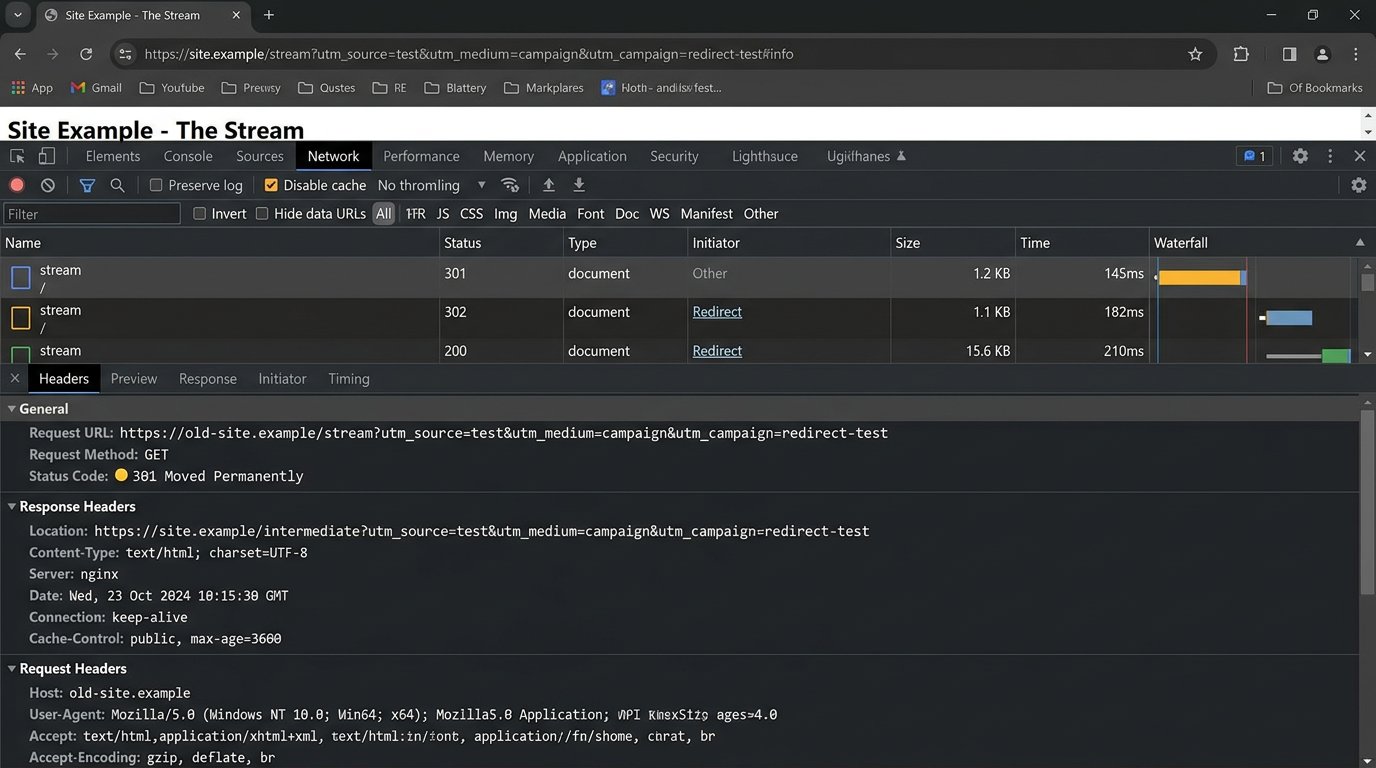
When an old domain in the chain is normal, and when it's an error
An old domain in the chain doesn't always mean a problem. After a migration, a route like old-site.example/stream → site.example/stream is normal: the old address accepts the request and permanently redirects the user to the equivalent page on the new site. The final domain is correct, the path is preserved, and the UTM tags haven't disappeared.
A bug is when old-site.example/stream leads to the new site's homepage, to a different landing page, or leaves the user on the old domain. A separate problem arises if the string after the question mark disappears after the redirect: the user lands on the right page, but analytics loses utm_source, utm_medium, and utm_campaign.
Check not only the final domain but also the path with parameters. A click to site.example without the right page or tags can distort campaign data just as much as a click to someone else's host.
Account for JavaScript redirects and link parameters
curl is convenient for server responses but doesn't always see redirects triggered by a script after the page loads. DevTools in the browser helps spot this scenario: first an intermediate page opens, then the script changes the address or sends the user to another domain.
In Network, check not only the main document but also the moment the address changes after it loads. If the UTM tags are gone, compare the original URL, the Location value, and the final string in the address bar. That way you can tell at which step the redirect rule dropped the parameters.
The downside of passing all parameters without checking: extra service values may end up on the target domain. For important links, it's worth defining in advance which tags, promo codes, and affiliate parameters must be preserved.
Check in-app browsers
Social networks, messengers, and streaming platforms often open a link not in the device's main browser but in an in-app one. Such a browser may send a different user-agent, restrict scripts, not save cookies, or handle redirects differently.
Open the link directly from the app of the platform where it's placed. Then repeat the test via the "Open in browser" option if it's available. Compare the final domain, path, UTM tags, and the behavior of the form, payment, or authorization.
The downside of checking in an in-app browser: not all apps let you view the technical request chain. It's still important because that's often how the mobile audience clicks through.
Compare clicks from different regions and conditions
If the site uses geo-redirects, a CDN, or different versions of landing pages, repeat the check via VPN, proxy, or a remote device in the desired region. Compare the final domain, path, URL parameters, and landing page content.
Check not only the country but also the browser language, authorization, cookies, and device type. These conditions can affect the route: for example, a user from one region is sent to a local subdomain, while a visitor without cookies is sent to a general landing page.
The downside of VPN and proxy: they don't always fully reproduce a real viewer's conditions. Geolocation can be determined by several signals, so such a test confirms a possible problem but doesn't cover the entire audience.
Confirm the domain in Yandex Metrica and GA4
In Yandex Metrica, look at the reports on entry pages and page URLs. Filter the data by full address or the desired domain, then add a segment by UTM tag, source, or campaign. That way you can see on which host the visits started after a specific placement.
In GA4, use the Hostname dimension together with the landing page, session source, and campaign for such a check. Compare how many sessions came to the main domain, the old address, and important subdomains. If the tag is installed on several hosts, the report quickly shows traffic mixing.
The downside of analytics: counters don't record some visits due to ad blockers, disabled JavaScript, or the page closing before the tag loads. Also, the data won't help for a domain where the counter isn't installed at all.
Check requests in server logs
Server logs confirm which requests actually reached the site's infrastructure. For the check, you need fields with time, Host, URL, response code, user-agent, and referer if it's passed. Look for requests during the link launch period and separately look at requests to the old and target domains.
Responses 301, 302, 307, and 308 will show that the server redirected the user. Requests with a 200 status to the target host will confirm that the page was served from the correct domain. If the logs show clicks to the old host but no requests to the new one, check the redirect rules and possible connection errors.
The downside of logs: they include bots, scanners, and technical requests. Referer is often missing for clicks from apps and messengers, so the source of a specific visit can't always be reconstructed.
Separate the main domain and subdomains in reports
The landing page, account area, payment, and knowledge base may be on different subdomains. If you combine them in one report without segments, you might not notice that a link from the stream leads to promo.site.example instead of the main site, or to checkout.site.example before the visitor has seen the offer.
Create a separate segment for the target host and keep a general report across all project domains. The first will help you monitor landing traffic, the second will let you see the user's path between the landing page, payment, and account area.
The downside of overly strict filtering: a normal transition between subdomains may disappear from the report, and the funnel will look broken.
Link verification checklist before placement
- Open the link from the place where the audience will see it.
- Check the final domain, path, and parameters in the address bar.
- Look at the 3xx chain and Location headers via curl or Network.
- Make sure the old domain preserves the path and UTM tags on redirect.
- Repeat the click in the app's in-app browser.
- Check another region if geo-rules are used.
- Compare Hostname and landing pages in analytics after launch.
- Confirm requests to the correct host via server logs.
After changing the domain, CDN, landing page, or redirect rules, check both new and old links. Old stream descriptions, videos, and pinned posts may continue to bring the audience to an outdated route.
Last Articles
What has changed in design and functionality We have updated the website to make working with it faster and more convenient. The main changes affect ..
Good afternoon, I've collected all the news during this time.: 1. The main news is that prices for twitch viewers have been greatly reduced, while Tw..
1. Use promo code "December2025" for a 15% discount for all our viewers2. We have reduced the base prices for our configurator and the most affordable..
Twitch services are working stably, so we are ready to cooperate with squads, resellers, service owners, bot owners, and many others.Individual te..
We have completely updated our Twitch viewer services, and they are now working stably. We only use high-quality IP addresses for the viewers.The ..
Hello everyone! Today, we are announcing a new feature—"Twitch Viewer Configurator". Now, you can customize any plan for your Twitch channel. Choo..
Greetings, I have compiled a guide for streamers, which will be very relevant at the moment. Now YouTube and twitch have disabled monetization from vi..
We have finally developed the APINow it will be more convenient for our partner sites to work with us.To update the maximum tariffs for YouTube, an up..
Due to the huge popularity of the partnership services and referral program, we have made a cooperation table. The essence is very simple: more live a..
Our Services for Streamers








Our Services for Content Creators






