
Checking your balance via API before launching orders in bulk
Why request the balance before launching a queue
Launching orders in bulk without a fresh balance check leads to partial failures: the first orders are created, and the following ones get an insufficient funds error. This situation is hardest to untangle with parallel submission, different services, and multiple processes working with the same account.
What matters for the launch is not the total amount of top-ups or the accounting balance in your dashboard. You need the amount the service allows to be charged at the moment a new order is created. Funds for active orders may already be reserved, even though the final charge is not yet reflected in the transaction history.
Compare the queue budget against the available balance field, not the total amount on the account.
What the balance method response looks like
The field names are defined by the documentation of each platform, but a convenient balance method contract usually returns total, available, reserved, currency, and updated_at. Below is an example structure you can use as a reference when integrating. This is not a universal response for every service, but an example of a clear data schema.
The request might look like this:
curl -X GET "https://api.example.com/v1/balance" \
-H "Authorization: Bearer API_TOKEN" \
-H "Accept: application/json"
Response:
{
"total": "125.80",
"available": "84.50",
"reserved": "41.30",
"currency": "USD",
"updated_at": "2025-01-15T10:42:18Z"
}
In this example, total is all the account's funds, available is the money for new orders, and reserved is the amount held for previously created operations. The check adds up: 125.80 minus 41.30 equals 84.50. The currency field sets the unit of calculation, and updated_at helps you understand how fresh the data is.
How to interpret available and reserved
The available field is used to decide whether to launch. If the queue costs 80.00 and available is 84.50, there are only enough funds provided the API does not add a separate fee or recalculate the price at the moment the order is created. The reserved field is not added to the available balance: that amount is already taken.
reserved may include the cost of orders with processing, pending, or review statuses — the exact set depends on the platform's rules. Sometimes the reserve is released after cancellation, partial completion, or manual review. That is why calculating it yourself from the order list can only serve as an additional cross-check.
- total is suitable for reconciling against the history of top-ups and charges;
- available is suitable for clearing a new queue for launch;
- reserved shows how much is already locked for active operations;
- currency cannot be ignored even when working with only one account;
- updated_at is useful for the log and for diagnosing a stale response.
A response with only a balance field is simpler to process, but it has a drawback: you cannot tell whether that money is immediately available or part of the amount is already held for other orders.
Check the amount format in the API documentation
In the example, the amounts are passed as strings: "84.50", not the number 84.5. This format preserves the exact value the service returned. If the API uses strings with a decimal point, you should not immediately convert them to floating-point numbers and compare using float.
For example, your calculation might yield 84.499999 instead of the expected 84.50. At the budget boundary, this can wrongly let a queue through or, conversely, stop it. For operations with string decimal values, use a decimal data type that supports fixed fractional precision.
Another common contract is integer minor units. Then the response might contain "available_minor": 8450 and "currency": "USD", and the order price might be "price_minor": 1250. Inside such an API, 8450 means 84.50 if the currency rules assume two fractional digits. You can divide the value by 100 only when the documentation explicitly says so.
Do not mix currencies and price formats
Before calculating the queue, compare the currency from the balance with the currency of the pricing method or the order creation response. If the balance returns one currency and the service catalog returns another, you cannot plug the numbers in directly. You need either a calculation provided by the platform itself or a separate confirmed conversion method.
Pre-converting on your side is convenient for planning, but it has a drawback: the service may apply a different rate, fee, or rounding rule at the moment of charging. It is more reliable to submit an order with parameters for which the API returns the final cost in the balance currency, or to get the price calculation immediately before creation.
If the pricing method responds with "price": "12.345" while the balance stores values with two digits, clarify the rounding rule. Do not round down automatically: the actual charge may turn out higher. To clear a queue for launch, use exactly the amount the API calls the final order cost.
Calculate the queue budget before the first request
Before launching, assemble all the orders and calculate their cost taking into account the volume, the selected service, the region, additional options, and the fee if it is passed separately. Do not compare available against the base price from the interface: in the API, the total may depend on the parameters of the specific order.
Suppose the queue has three orders. The pricing API returned 18.40, 27.15, and 31.60 for them in the same currency specified in balance.currency. The budget is 77.15. If balance.available is 84.50, 7.35 remains after the planned launch. If available is 76.90, the entire queue cannot be launched.
- Get prices based on the actual parameters of each order.
- Add up the final costs without changing their format or currency.
- Compare the budget against available from a fresh balance response.
- If the balance is sufficient, record the amount as a local launch reserve.
- After each order is created, reduce the local reserve by the confirmed cost.
A buffer reduces the risk of failure from an additional charge, but it has a drawback: part of the available funds will remain unused, even though the queue could have gone through in full.
Do a second check right before submission
A balance obtained while preparing a campaign quickly becomes outdated. In the time between calculation and launch, another operator, automation, or an active order can change available and reserved. A repeat request is needed after the queue is assembled and immediately before the first order.
A workable scheme has two stages: first get the prices and estimate the budget, then request the balance once more. If the available value has decreased and fallen below the calculated amount, the queue is not submitted in full. Between the final check and the launch, do not perform other charges from the same account.
A single request for the whole launch reduces the load on the API, but its drawback is that the available balance may change while a long queue is still being processed.
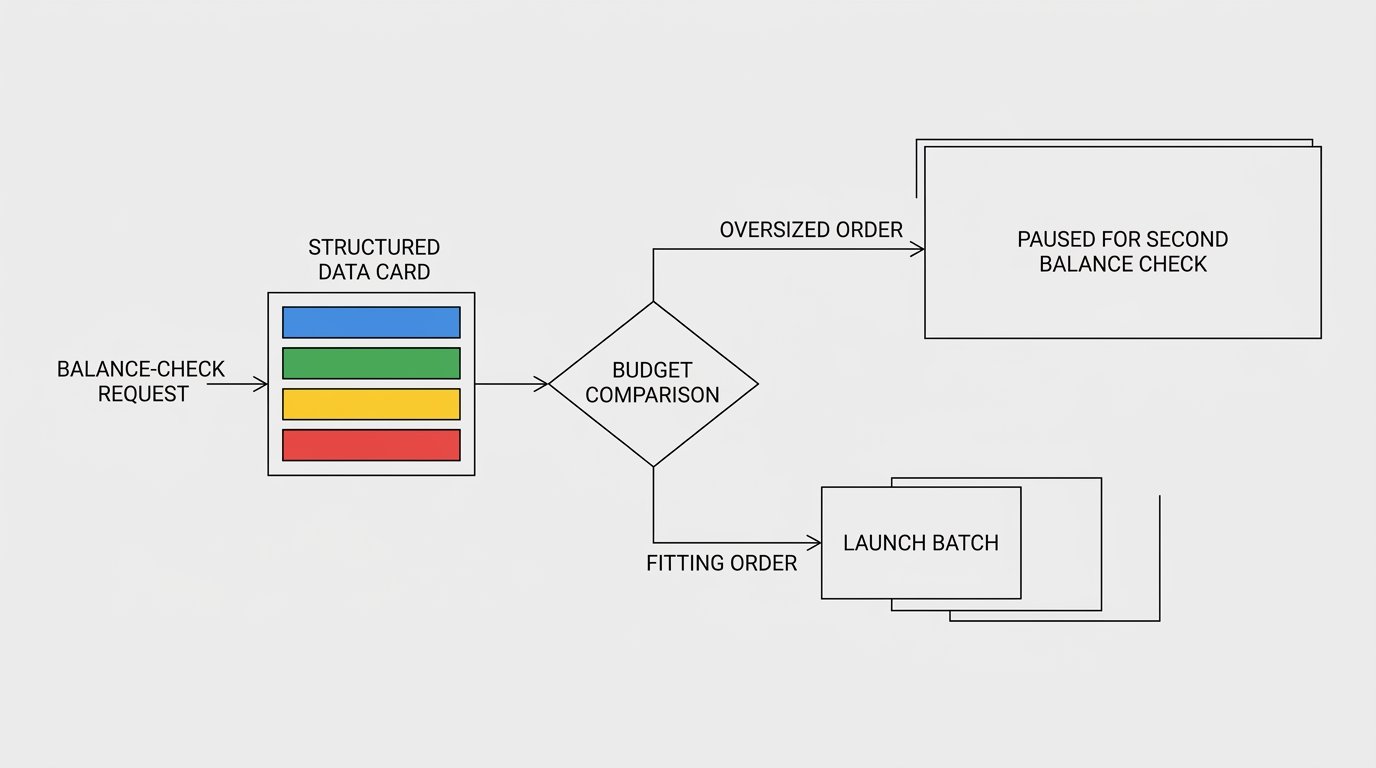
How to launch a queue when funds are insufficient
If available is less than the budget, do not send all the requests hoping that some will go through. Split the queue into batches whose cost fits within the available limit. In the example with a balance of 76.90, you can send the first two orders for 45.55, then stop: the third one at 31.60 requires a repeat check.
Set the order sequence for batching explicitly. You can send priority orders first, or form batches with similar costs. Each option has a drawback: priority order will postpone less important items, while sorting by price may disrupt the original campaign plan.
- Form a batch with a total no higher than the current available.
- Create the orders from the batch and save their identifiers.
- Wait for responses or check operation statuses after timeouts.
- Pause if the API limits or the service rules require it.
- Request the balance again before the next batch.
After each batch, rely on the new API response, not just on a local deduction from the previous balance. A local calculation is useful for control, but it does not see refunds, external charges, or reserve recalculations.
Protect the budget during parallel submission
With sequential processing, it is enough to reduce the local limit after an order is confirmed. With a parallel model, two workers can simultaneously see available 84.50 and each plan a spend of 60.00. Both decisions look acceptable on their own, but together they exceed the available balance.
Protection requires a shared local reserve counter or a queue that is accessed atomically. Before submitting, a worker tries to claim the order amount in this counter. If there is not enough free limit, the order waits for a repeat balance check.
- A sequential queue is easier to control but launches more slowly.
- Parallel submission shortens launch time but requires locking the shared budget.
- Local reservation reduces conflicts but may hang after a worker failure.
- Reservation on the API side is more reliable but is not available on every platform.
If the process ended before a response was received, the local reserve cannot immediately be considered spent or free. First check whether the order was created, using its external identifier or an operation search method.
Use the API reserve if one is provided
Some APIs let you create a reserve for a set of operations or run an order in two steps: calculation, amount lock, confirmation. In such a scheme, there is a smaller window between the check and the charge in which another process can spend the account's funds.
If such a method exists, save the reserve identifier, its amount, currency, expiration, and status. Then pass this identifier when creating orders if the API contract requires it. After the queue is complete, reconcile the unused portion and confirm the lock was released.
An API reserve does not solve every problem: it may have a short expiration, may not cover fees, or may be released after a confirmation error. A local reserve is easier to implement, but its drawback is that it does not protect against spending created outside your application.
Separate a balance error from a zero balance
An error code response, a timeout, or a rate limit does not mean that available is zero. Do not automatically substitute the last known value if a large launch depends on it. If a fresh balance cannot be obtained, the queue must be paused.
Handle order creation failures separately. They may be caused by insufficient funds, but also by an invalid service identifier, an unacceptable volume, a channel restriction, or a duplicate of the same operation. Save the error code and text together with the order's external identifier.
- On an authorization error, refresh access and only then retry the request.
- On a rate limit, wait according to the API rules.
- On a creation timeout, first check whether the operation actually appeared.
- On an insufficient funds error, stop the batch and request the balance again.
Do not create duplicates after a timeout
A timeout means your client did not receive a response, not that the server did not process the request. Resubmitting without checking can create a second order and charge the money again. This is especially dangerous in a queue where automatic retry is configured for several attempts.
Pass a unique external order identifier if the API supports a client_order_id, external_id, or idempotency_key field. Save it before sending the request. After a timeout, find the operation by this value or request the status by the identifier received earlier.
Retrying without checking is faster, but its drawback is direct: duplicate orders, double reservation, and discrepancies between your budget calculation and the actual charges are possible.
What to keep in the launch log
The log helps reconstruct the course of a bulk operation and explain why a particular batch stopped. For each launch, save the time of both checks, total, available, reserved, currency, the calculated budget, the size of the local reserve, and the list of external order identifiers.
For each creation attempt, record the cost, response code, technical operation identifier, and final status. Secrets do not belong in the log: authorization tokens, API keys, full request headers, and personal data must be masked or excluded before writing.
Full logging is convenient for debugging, but it has a drawback: without filtering, access data and customer information can end up in storage.
Test the scheme on a small queue
Before a large launch, run a short scenario: get the balance, request the final prices, create a limited batch, request the balance again, and compare the expected change in available and reserved with the actual response. This way you can notice when the service reserves the amount and when it charges it for good.
A test batch does not guarantee the same behavior under heavy load: limits, parallel processes, or restrictions of a specific service may kick in. That is why in a bulk queue you should keep splitting the launch into batches, checking the available balance between them, and handling each failure separately.
Last Articles
What has changed in design and functionality We have updated the website to make working with it faster and more convenient. The main changes affect ..
Good afternoon, I've collected all the news during this time.: 1. The main news is that prices for twitch viewers have been greatly reduced, while Tw..
1. Use promo code "December2025" for a 15% discount for all our viewers2. We have reduced the base prices for our configurator and the most affordable..
Twitch services are working stably, so we are ready to cooperate with squads, resellers, service owners, bot owners, and many others.Individual te..
We have completely updated our Twitch viewer services, and they are now working stably. We only use high-quality IP addresses for the viewers.The ..
Hello everyone! Today, we are announcing a new feature—"Twitch Viewer Configurator". Now, you can customize any plan for your Twitch channel. Choo..
Greetings, I have compiled a guide for streamers, which will be very relevant at the moment. Now YouTube and twitch have disabled monetization from vi..
We have finally developed the APINow it will be more convenient for our partner sites to work with us.To update the maximum tariffs for YouTube, an up..
Due to the huge popularity of the partnership services and referral program, we have made a cooperation table. The essence is very simple: more live a..
Our Services for Streamers








Our Services for Content Creators






