
Boosting traffic with referrers and verifying referral sources
Why you need the referral source in channel analytics
A referrer shows the page or domain from which a user supposedly clicked through. For a streamer, it's not just a line in a report but a way to link a visit to a specific action: an announcement post, a video, a partner integration, a community post, or a link on a niche website.
The source helps you understand which part of the audience comes to the stream after an announcement, where viewers find recordings, and which external platforms bring people to the channel page. But a domain alone doesn't confirm traffic quality. A source is only useful together with what viewers do after the click.
What questions a referrer report helps answer
A source report is for practical decisions, not for admiring impressive numbers. If clicks from a partner's platform increased after a placement, you can check whether those users opened the stream, watched recordings, subscribed, and came back for subsequent broadcasts.
This kind of breakdown helps compare not only platforms but also formats. One announcement may bring many casual visitors to the channel page, while another brings fewer people but with a noticeable share of stream starts and repeat visits. The downside of the referrer is that a single domain usually doesn't show which specific post, author, or site section generated the click.
How to read a source row in a report
Don't evaluate a referrer in isolation from the date, time, and landing page. First find the traffic spike, then recall what was happening at that moment: was a stream live, was an announcement published, was an ad running, was a link placed with a partner. If no events occurred, the source needs further verification.
After that, open the segment for the specific domain. Look at where people landed, how long they stayed on the channel, whether they started the broadcast, and what they did next. Clicks from a post about a stream would logically be expected on the stream page, the channel page, or a prepared landing page. A flow to random old recordings isn't necessarily fake, but its origin should be explained.
Which metrics to compare across sources
The number of sessions shows the scale of the flow, not its value. Compare the actions available in your analytics within the same period: stream views, watch duration, page-to-page transitions, subscriptions, chat messages, link clicks, and repeat visits.
It's especially useful to compare sources against a single goal. If the purpose of an announcement is to bring viewers to a live stream, the key signals will be stream starts and retention, not overall traffic to the channel. If a recording or a series of videos is being promoted, look at content views and transitions to other materials. The downside of this approach is that not all platforms pass the same set of events.
How to match clicks with an actual placement
Every verifiable placement should have a clear chain: the publication, the link, the release date, and the data in the report. Save the URL of the post or page, the publication time, the announcement format, and the link used for the click. Then traffic growth can be verified rather than explained after the fact.
If a partner claims they sent clicks but the publication can't be found, ask for the link, a screenshot of the placement, or data from their dashboard. A deleted post sometimes can't be recovered, so the absence of a link doesn't prove boosting. But without confirmation, such traffic can't be counted as the result of a specific advertising activity.
Why you need separate link tags
A referrer distinguishes platforms but often doesn't distinguish multiple publications within a single platform. Separate tags in links help separate an announcement for a morning stream from an evening one, an ad with one creator from another, a permanent link in a profile from a one-off post.
For each agreed placement, prepare a separate link and add it to your placements table. This lets you see not just the domain but the specific campaign. The downside of tags is that a viewer may copy the link, remove the parameters, or open it through an app that passes click data incompletely.
What is called traffic boosting with referrers
Traffic boosting with referrers is artificial visits that are assigned a specified referral source. In a report, such a flow doesn't look like undefined or direct traffic but like clicks from a social network, forum, media outlet, directory, or website where the channel may not have been mentioned at all.
A provider may offer this as a way to make the statistics more varied or to show interest from external platforms. In practice, a referral row doesn't turn a technical visit into an engaged viewer. A spoofed source distorts attribution and makes it harder to understand where budget should actually go.
Why referrers are added to artificial traffic
An unexplained rise in direct visits is noticed in a report more quickly: there are no announcements, searches, mentions, or a clear reason for the spike. A specified referrer is meant to create the appearance of a connection to a known or niche platform and make the report more convincing to the client.
Sometimes the flow is distributed across several domains so it doesn't look like one mass series of visits. The downside of this method for a channel owner is obvious: real publications often can't be verified, and visitor behavior doesn't match the audience of the platform that supposedly brought them.
What signs to look for in a suspicious segment
A single unknown domain doesn't mean boosting. Referrers can be changed by redirects, link preview services, URL shorteners, in-app browsers, and privacy settings. What needs checking isn't the source name but the combination of spike timing, a confirmed publication, the landing page, and user actions.
- Clicks appeared without streams, announcements, integrations, seeding, or other clear reasons.
- The source website has no link to the channel, no partner publication, and no mention of the stream.
- Visitors land on a single page and almost never start the broadcast, watch recordings, or navigate through the channel.
- Visits repeat in series at times atypical for your audience.
- The segment has unusual geography, interface language, device types, or other parameters that don't resemble the audience of the stated platform.
- Several similar domains produce identical short sessions and an identical set of actions.
What to look at in a source and referrer report
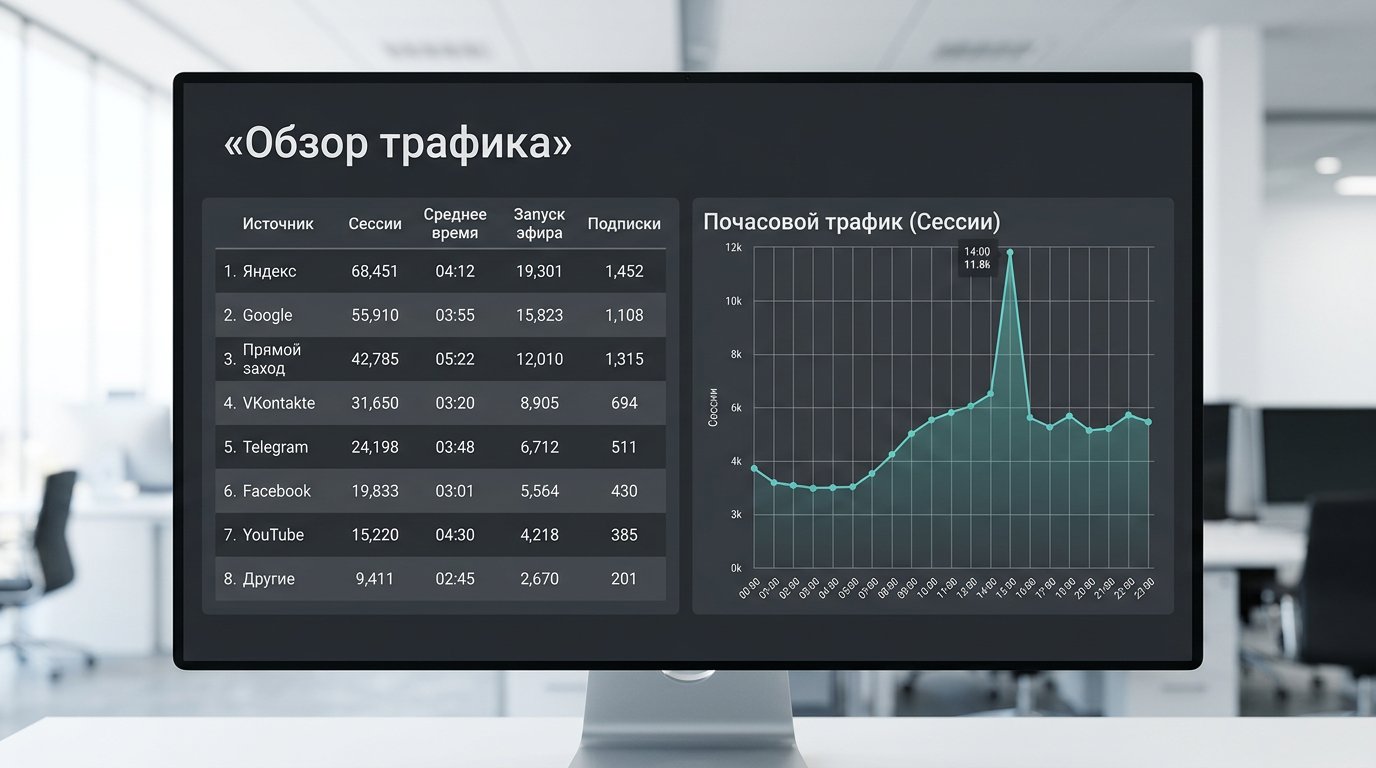
Start with the sources table and select the domain you want to check. Set the period around the placement date rather than looking at a general monthly report. This makes it easier to see when the traffic appeared, how long it lasted, and how it connects to a publication or stream.
Next, compare the suspicious segment with other sources over the same period. It's useful to compare not only sessions but also the share of stream starts, average watch time, subscriptions, chat, and returns. If traffic from the referrer differs noticeably across all actions, that's a signal for verification, not a final verdict.
Verifying landing pages
The landing page shows where the link actually led. For a stream announcement, clicks to the stream, the channel page, or an announcement with a schedule are normal. For a video, clicks to the specific recording or playlist are normal. If the stated placement led to a broadcast but the entire flow arrived at unrelated materials, ask for an explanation.
This criterion has a limitation: a viewer may have opened a saved link later, clicked through a repost, or reached another material via recommendations. That's why a landing page can't be interpreted without the visit date and post-entry behavior.
Verifying engagement after entry
Look at the user's path after the first page. Real interest doesn't have to end in a subscription, but usually part of the audience starts the stream, opens other materials, reads the description, goes to the schedule, or returns later. If thousands of sessions produce almost no available actions, the value of the source is questionable.
A cold audience can also leave quickly, especially with a poor choice of topic or publication time. The downside of evaluating by engagement is that it doesn't separate boosting from a weak ad placement with 100% accuracy. It shows whether the acquisition channel is worth repeating and paying for further.
How to verify a referrer step by step
- Record the date, time, and size of the spike in the report.
- Cross-check that interval against the calendar of streams, posts, collaborations, and ad placements.
- Open the source segment and look at the landing pages.
- Check stream views, depth of interaction, subscriptions, chat, and repeat visits.
- Find the publication on the stated platform or request confirmation from the partner.
- Compare the segment with other clicks from a similar placement format.
- Mark the source as confirmed, unverified, or excluded from performance calculations.
Don't delete questionable data right away. Save the original report, the verification date, and the reason the source isn't counted in the campaign evaluation. This helps avoid mixing the initial numbers with cleaned analytics and lets you explain the decision to your team or partner.
How to calculate performance after traffic verification
For internal evaluation, it's useful to split sources into confirmed and unverified. The first segment has a publication or a tracked link; the second has only a row in analytics. Don't add them into a single campaign result: otherwise unconfirmed visits may inflate reach and lower the real cost of a useful action.
If a source brings people but doesn't deliver the desired result, it isn't necessarily boosting. Perhaps the platform's audience didn't match the channel's topic, the announcement didn't explain the value of the stream, or the link went out at the wrong time. The downside of honest placements is that they don't guarantee the same reaction even with similar reach.
What conditions to request from a promotion provider
If the service includes external clicks, agree in advance on the platforms, publication format, links, and reporting method. The provider should explain where the announcement will be placed, which page it leads to, and how you can verify the placement. A report with only session counts and referrer names doesn't confirm real promotion.
A reason to decline an offer is a promise to bring traffic from any chosen domains without publications on those platforms. Guarantees of an exact number of clicks from a known resource are also risky if the placement and audience quality can't be verified. It's safer to choose clear seeding, ads, and partner placements with trackable links.
What to do with recurring suspicious clicks
If the same unclear source regularly appears in the report, don't use it as an argument for the campaign or channel growth. Separate this segment in analytics, save examples of the spikes, and stop paying for traffic that isn't confirmed by publications and audience actions.
When working with a partner, request the source data on the placement: the publication URL, release date, link format, and any changes made after launch. If the explanation doesn't match the report, it's better to change the provider or the acquisition channel. A referrer should help verify promotion, not replace its evidence.
Last Articles
What has changed in design and functionality We have updated the website to make working with it faster and more convenient. The main changes affect ..
Good afternoon, I've collected all the news during this time.: 1. The main news is that prices for twitch viewers have been greatly reduced, while Tw..
1. Use promo code "December2025" for a 15% discount for all our viewers2. We have reduced the base prices for our configurator and the most affordable..
Twitch services are working stably, so we are ready to cooperate with squads, resellers, service owners, bot owners, and many others.Individual te..
We have completely updated our Twitch viewer services, and they are now working stably. We only use high-quality IP addresses for the viewers.The ..
Hello everyone! Today, we are announcing a new feature—"Twitch Viewer Configurator". Now, you can customize any plan for your Twitch channel. Choo..
Greetings, I have compiled a guide for streamers, which will be very relevant at the moment. Now YouTube and twitch have disabled monetization from vi..
We have finally developed the APINow it will be more convenient for our partner sites to work with us.To update the maximum tariffs for YouTube, an up..
Due to the huge popularity of the partnership services and referral program, we have made a cooperation table. The essence is very simple: more live a..
Our Services for Streamers








Our Services for Content Creators






