
How to reschedule a scheduled post in Telegram
Can a scheduled post be rescheduled
In Telegram, the time of a scheduled message is changed through the post menu in the queue. The command you need is "Reschedule": it opens the selection of a new date and time. You usually don't need to delete the publication and recreate it from scratch.
Editing the text does not change the schedule. If the post was created via an external bot or service, you should look for it first and foremost in the tool where it was scheduled.
Where to find the queue of scheduled messages
Open the channel and tap the calendar or clock icon next to the message field. In the list of scheduled publications, find the one you need by its text, attachment, and the specified time.
The queue icon appears when there are scheduled messages. If it's not there, make sure you've opened the right channel and that you have permission to work with publications. Also check whether the post was created via a third-party tool.
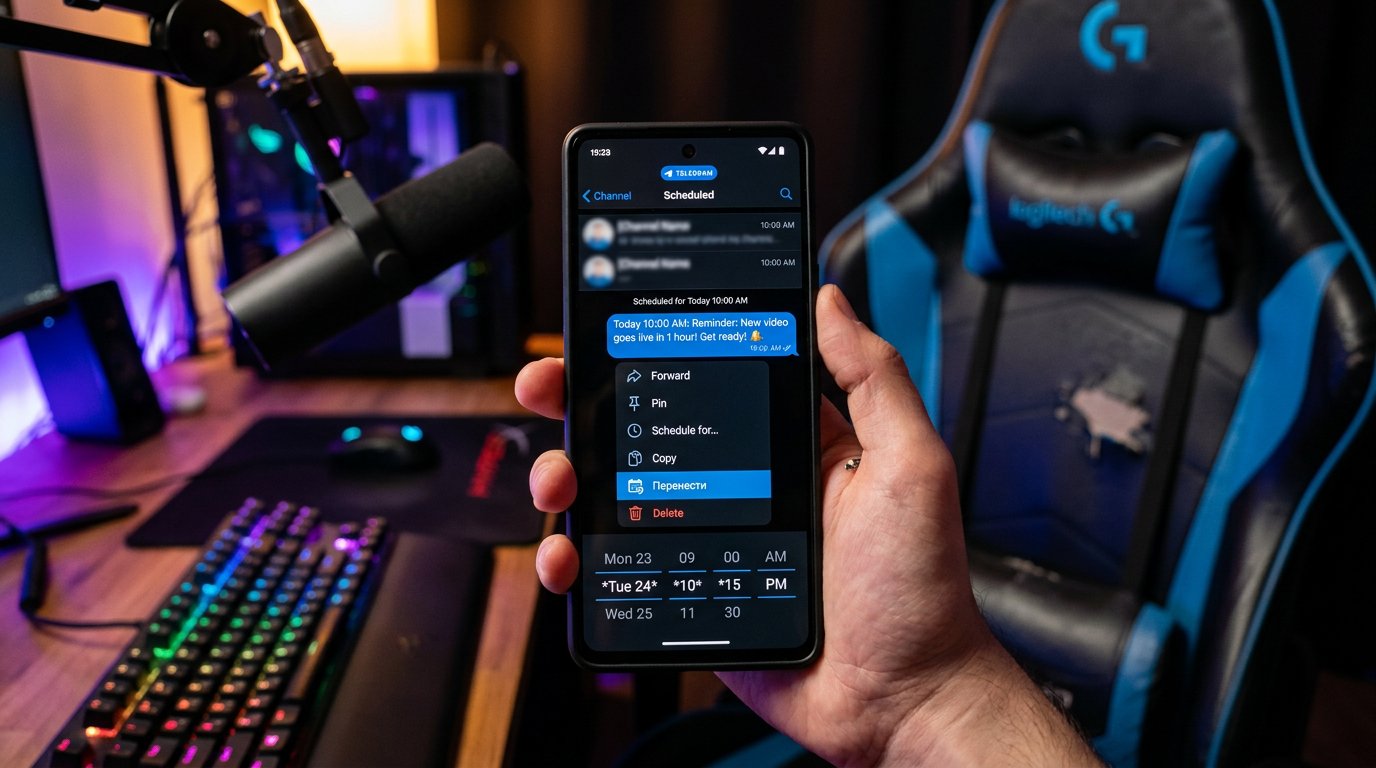
How to change the publication date and time
On your phone, tap the message you need in the queue and hold it until the menu appears. In Telegram Desktop, open the menu with the right mouse button. Select "Reschedule", specify the new date and time, then confirm the action.
Go back to the queue and check the time under the post. If the time hasn't changed, repeat the action and make sure you confirmed your selection. The names and placement of elements may differ in other interface languages and app versions.
Which commands do not change the schedule
The "Edit" option opens the content of the message: the text, caption, or available settings. If you save the edit without rescheduling, the post will stay at its previous time. The "Send now" command, by contrast, publishes the message immediately.
If you need to fix both the text and the schedule, first save the content, then open the menu again and select "Reschedule". After that, check both changes in the queue.
How to reschedule a post with a photo or file
For a message with a single attachment, open its menu and select "Reschedule", just as for a text post. After confirming, check the date, the file, and the caption. If the caption contains a link, make sure it was preserved and leads where it should.
The downside of checking only the time: it won't reveal an accidental error in the content. This is especially important if the text or attachment was also edited before rescheduling.
What to check when rescheduling an album
An album consists of several media files combined into a single publication. After rescheduling, check the entire group in the queue: the order of the files, the caption, and the displayed time. Don't consider the rescheduling of the whole group complete until you've verified its composition.
If the app shows parts of the album separately or the result of the action is unclear, check each part. If necessary, recreate the publication, keeping the original files and caption.
How to recreate a post if the command is missing
Deleting and rescheduling is a fallback option when you can't reschedule the entry. First, save the text, links, and files, and for an album, note the order of the attachments. Only then delete the old entry from the queue.
Create the post again. On your phone, hold the send button and select "Send later". In Telegram Desktop, open the additional actions of the send button with a right-click and select scheduling. Specify the time, confirm it, and check the new entry in the queue.
The downside of recreating is that formatting, buttons, and the album composition may require separate setup. Make sure the old copy is deleted, otherwise both posts may go out.
How to check the date and time zone
Before confirming, check the day, month, hours, and minutes. If the command schedules for an audience in a different time zone, clarify in advance which time the plan refers to, and check your device's time settings.
After rescheduling, rely on the date shown in the Telegram queue. Leave a buffer before the previous deadline: during checking or recreating, the post may go out and stop being scheduled.
How to reschedule a post via a bot or service
An external tool may store the publication on its side and send it to the channel only at the designated moment. In that case, there will be no entry in the Telegram queue. Open the schedule in the bot or service where the post was created, change the time, and check that the task is saved and active.
The downside of this method is that rescheduling depends on the tool's capabilities and availability. If you don't have access to it, the absence of an entry in Telegram doesn't mean the external task was canceled. Before creating a replacement, check the original schedule.
What to do if the post is already published
For a message that has already gone out, you can't reschedule the send time the way you can for a scheduled one. You can leave it in the channel or delete it and schedule it again. Before deleting, save the text and attachments.
The republished post will be a separate message: the previous views and discussion won't carry over to it. If the sending was managed by an external service, check its schedule too, so the old task doesn't create yet another post.
Last Articles
What has changed in design and functionality We have updated the website to make working with it faster and more convenient. The main changes affect ..
Good afternoon, I've collected all the news during this time.: 1. The main news is that prices for twitch viewers have been greatly reduced, while Tw..
1. Use promo code "December2025" for a 15% discount for all our viewers2. We have reduced the base prices for our configurator and the most affordable..
Twitch services are working stably, so we are ready to cooperate with squads, resellers, service owners, bot owners, and many others.Individual te..
We have completely updated our Twitch viewer services, and they are now working stably. We only use high-quality IP addresses for the viewers.The ..
Hello everyone! Today, we are announcing a new feature—"Twitch Viewer Configurator". Now, you can customize any plan for your Twitch channel. Choo..
Greetings, I have compiled a guide for streamers, which will be very relevant at the moment. Now YouTube and twitch have disabled monetization from vi..
We have finally developed the APINow it will be more convenient for our partner sites to work with us.To update the maximum tariffs for YouTube, an up..
Due to the huge popularity of the partnership services and referral program, we have made a cooperation table. The essence is very simple: more live a..
Our Services for Streamers








Our Services for Content Creators






