
How to Tell If Your Kick Stream Shows Up in Recommendations
Why Kick recommendations can't be seen directly in analytics
Kick doesn't show the author a list of users who were served the stream in a recommendation block, and it doesn't explain the reason for each impression. You can't open a report and separate viewers who came from the homepage or a personalized feed from those who found the channel through search, a category, or an external link.
Checking recommendations relies on several indirect signals. You need to capture the stream card in a clean session, get the same findings from independent people, and match the impression times with the influx of viewers. A single impression found doesn't mean the stream is recommended to all new users.
Why your own account isn't suitable for checking
Checking from your own account yields almost no useful data. The feed can be influenced by watch history, subscriptions, language, region, past visits to the channel, and other actions. If your stream appears in the author's feed, that only confirms the personalized feed of that account.
Even a private tab doesn't always create a fully neutral environment. It clears part of the local browser history, but it doesn't cancel out the influence of region, interface language, device type, and the current set of active streams. That's why you need more than one test — several checks under different conditions.
Check the homepage without logging in
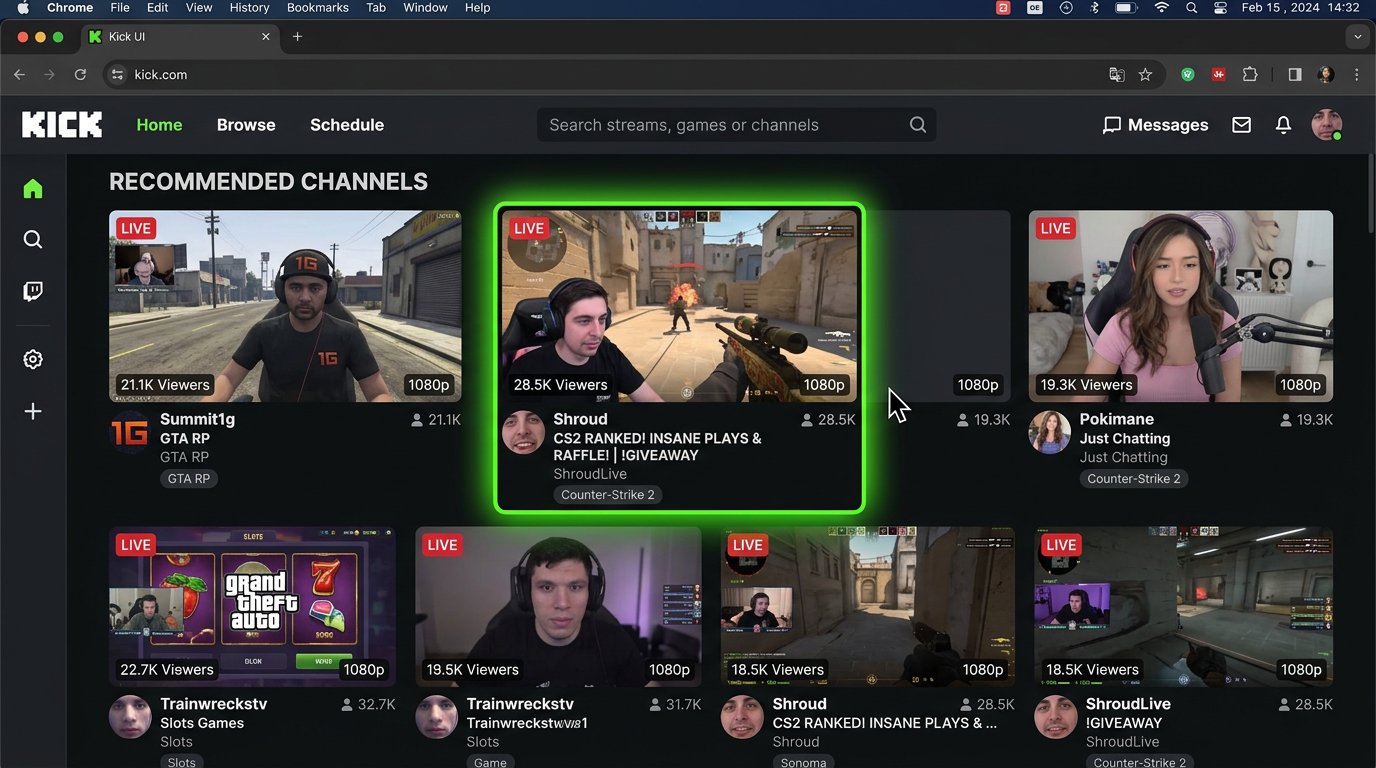
Open Kick in a private window or in a browser that hasn't been used on the platform before. Don't log in, don't open the stream link in advance, and don't type the channel name into search. After the stream starts, go to the homepage and look through the visible blocks with cards.
Record the time of the check, the name of the block, the card's position in the row, and its position after scrolling. If there are several feeds on the page, note each one separately. A screenshot or a short screen recording will help confirm which route the channel was discovered through.
Separate recommendations from search and the catalog
Don't call any way of finding a stream a recommendation. If a user typed in the channel name, that confirms search works. If they opened a category and saw the stream among other streams, that means visibility in the catalog. Both sources are useful, but they don't prove an impression in a recommendation block.
Checking recommendations requires a different scenario: a viewer opens the homepage without a direct link, search, or going into a category, and then sees the stream card in a block that suggests channels or streams. It's best to record the block name exactly as it appears in the interface.
Account for changes in the interface and feed
The layout of the Kick homepage can differ between users and change during a stream. A card may appear in one region but be absent in another, be visible on a computer and not show up in the mobile version. This is the drawback of any manual test: it only shows a specific moment and a specific environment.
Don't tie the method to a single section name or to the exact position of the card. The main sign stays the same: a person who didn't search for the channel and didn't follow a link saw the stream on the homepage in a feed suggesting content to watch.
Bring in independent observers
Ask several people who aren't subscribed to the channel and don't watch it regularly to run the same check. Don't send them the stream link: a direct visit changes the route and makes the observation useless for assessing internal recommendations.
Have each of them open Kick without logging in, look at the homepage, and record the result. What matters isn't just the answer "saw it" or "didn't see it," but also where it was found: homepage, a specific block, category, search, or an external link. A screenshot with the card and the block name is more reliable than a simple message.
Check streams under different conditions
It helps if observers use different devices, browsers, and connections. People from different regions will help you see whether the impression repeats across several feed variations. The drawback of this approach is that the results can't be reduced to a single position: conditions will differ for every participant.
Don't ask observers to watch the channel in advance, subscribe, open clips, or write in chat. Such actions can affect further personalization. It's better to give a short instruction in advance: open the homepage without logging in, don't search for the channel name, record the time, and note where it was found.
Remove known external sources from the test
For a cleaner check, run one or more streams without the usual announcements on social media, in chats, and in communities. If you can't completely avoid posting, note the exact time of each link, mention, raid, clip release, or partner message.
Account separately for the actions of regular viewers. Someone may send the link to their chat or community, and you'll only find out after the viewer count has grown. You can't fully rule out such a source. But an event log will help you avoid attributing every unexplained influx of audience to internal recommendations.
Compare your checks with viewer count dynamics
A spike in viewers without an announcement may coincide with a recommendation impression, but on its own it proves nothing. Viewers could have come from search, a category, an old post, someone else's chat, or a link shared without your knowledge. That's why you should note not only the peaks but also their exact times.
Compare the time of the check with the viewer count graph. If an observer saw the card on the homepage, note the time down to the minute and see whether an influx of new viewers began afterward. If several people find the card around the same period and the viewer count grows without any recorded external causes, the connection looks more convincing.
Go by your usual scenario, not by other channels. Compare streams with similar start times, category, format, and duration. Otherwise the difference may be explained not by recommendations but by audience activity at a different hour, the stream topic, or competition in the category.
Keep a check log for each stream
Without recorded conditions, results quickly blur together. After several runs, it's hard to remember when the announcement went out, which category the stream was in, and at what moment the observer noticed the card. One table or note filled in during the stream is enough.
- Stream start time, the beginning and end of a noticeable viewer count increase.
- Category, language, stream title, and content format.
- Time of the check, device, browser, region, and whether logged in.
- Where it was found: homepage, block, category, search, or an external link.
- Screenshot of the feed and the approximate position of the card.
- Time of announcements, raids, posts, and other external events.
What results can be considered confirmation
A single screenshot on the homepage is a separate observation, not proof of ongoing recommendation traffic. A stronger signal appears when, across several similar streams, independent people find the channel in recommendation blocks and the log shows no external causes for a simultaneous increase in viewer count.
If a stream is consistently visible in a category but isn't found on the homepage, that doesn't mean it's blocked or that there are no recommendations. The checks performed only confirm visibility through the catalog. If the channel wasn't found anywhere, that also doesn't prove a complete absence of impressions: the test may not have hit the right region, moment of the stream, or interface variation.
How to use the check result
A recurring impression on the homepage is worth investigating further at different times of day and across several similar streams. Don't change the start time, category, title, design, and format all at once: with too many changes, you can't tell what exactly coincided with better discoverability.
If you couldn't confirm recommendations, rely on controllable entry points: an exact category, a clear stream title, a stable schedule, and external traffic sources. The test result is meant for allocating effort, not for trying to guess the algorithm.
Last Articles
What has changed in design and functionality We have updated the website to make working with it faster and more convenient. The main changes affect ..
Good afternoon, I've collected all the news during this time.: 1. The main news is that prices for twitch viewers have been greatly reduced, while Tw..
1. Use promo code "December2025" for a 15% discount for all our viewers2. We have reduced the base prices for our configurator and the most affordable..
Twitch services are working stably, so we are ready to cooperate with squads, resellers, service owners, bot owners, and many others.Individual te..
We have completely updated our Twitch viewer services, and they are now working stably. We only use high-quality IP addresses for the viewers.The ..
Hello everyone! Today, we are announcing a new feature—"Twitch Viewer Configurator". Now, you can customize any plan for your Twitch channel. Choo..
Greetings, I have compiled a guide for streamers, which will be very relevant at the moment. Now YouTube and twitch have disabled monetization from vi..
We have finally developed the APINow it will be more convenient for our partner sites to work with us.To update the maximum tariffs for YouTube, an up..
Due to the huge popularity of the partnership services and referral program, we have made a cooperation table. The essence is very simple: more live a..
Our Services for Streamers








Our Services for Content Creators






