
How to Check VKontakte Community Administrator Rights
Where to View Your Assigned Role
Your technical role is shown in the community's list of managers. If "Administrator" appears next to a profile, the assignment is active at the time of checking. A different label means access was granted under the corresponding role, even if the person is called an administrator on the team.
The "Manage" button alone does not confirm administrator rights: some tools are also available to other managers. For a specific task, besides the role name, it's important to check access to the section you need.
How to Find Your Role on a Computer
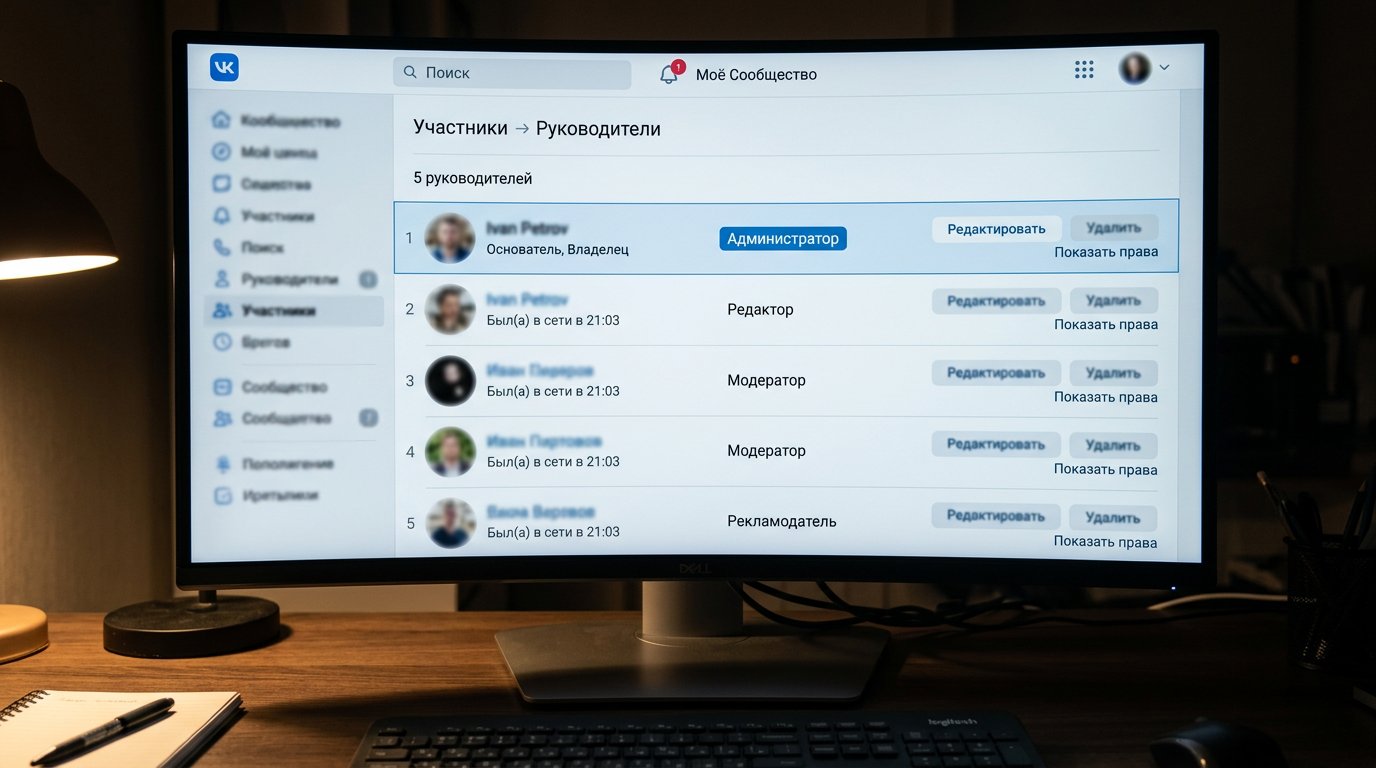
Log in to VKontakte under the personal profile that was granted access. Open the community you need, click "Manage," and go to "Members" → "Managers." Find your profile and look at the label next to it.
Verify the profile by its link, not just by name and photo: an employee may have several accounts, and different people may have similar pages. If the "Show rights" option is available in the manager's row, you can open it to view permissions.
How to Check Your Role in the App
Open the community page in the VKontakte app and find the management icon or gear. In management, go to members, then to managers, and find the profile you need.
Item names and locations may vary depending on the interface version. On a small screen, the section you need can be harder to find; in that case, try opening the full version of the site in a browser. It won't add any missing rights to the account.
What to Do If the List Is Unavailable
First, check the account: rights are tied to a specific profile, not to a person or device. For example, logging in from a work phone under a different profile won't transfer the assignment to it.
If the managers list won't open, ask the owner or a manager with assignment access to check the profile by its link. The downside of this check is that you have to get the result from someone else. At the same time, the absence of the list on your screen doesn't prove that the profile has no rights in the community at all.
How to Check Another Employee's Rights
In the "Managers" list, find the employee's page and compare its link with the one they use for work. Then look at the assigned role and, if the interface allows, open the details of its rights.
When working remotely, the list can be shown during a screen share or sent as a screenshot with unnecessary personal data hidden. A screenshot has a limitation: it captures the assignment only at the moment of the snapshot. For a current check, the list needs to be opened again.
How to Check Posts and Messages
To check work with content, open the post creation form in the community. To work with inquiries, go to the community messages and make sure the necessary dialogs are available. An open section confirms access to viewing or to the form, but not necessarily to sending and saving.
If it's important to check sending, agree on a test with a manager in advance and use a dialog with a colleague. The downside of the check is that it creates a real message. It's best not to use a subscriber's conversation for the test.
How to Check Community Settings
In management, open exactly the section you need for work: for example, community settings or the managers list. Access to one section doesn't mean permission to change others. If the page opens but the save button is unavailable or the change isn't saved, check the role and permissions for that task.
Don't delete posts, members, or managers just to test. Even a change that can be undone can affect the community's operation, so saving checks should be agreed on in advance.
How to Check Access to the Ad Account
Community rights and ad account rights are checked separately. Open the account you need under your work profile and check access to the tools required for the task. The list of account users and their permissions can be clarified with the person who manages access to it.
A community administrator doesn't necessarily have access to advertising. The reverse is also possible: a specialist works with ads but can't change community settings. Checking only one of these accesses doesn't replace checking the other.
How to Get or Change Rights
Send the person responsible for assignments the link to the profile and list the tasks: posts, moderation, replies in messages, or managing settings. This list makes it easier to choose permissions without unnecessary access. A broad role is convenient for management but gives more capabilities than an employee needs just to publish posts.
After the assignment, reopen the community under the same profile and check the sections you need. If access hasn't appeared, it's worth verifying the assignment and refreshing the page before repeating the check.
How to Revoke Access After Work Is Completed
The manager who handles assignments can find the employee in the "Managers" list, change their role, or remove them from the list. Before doing so, verify the profile link so you don't affect another team member.
Separately check access to the ad account and connected tools: removing a role in the community doesn't necessarily cancel them. Passwords, login codes, and tokens for confirming rights don't need to be shared. If a password has already been shared, change it and check the account's active sessions and connections.
Last Articles
What has changed in design and functionality We have updated the website to make working with it faster and more convenient. The main changes affect ..
Good afternoon, I've collected all the news during this time.: 1. The main news is that prices for twitch viewers have been greatly reduced, while Tw..
1. Use promo code "December2025" for a 15% discount for all our viewers2. We have reduced the base prices for our configurator and the most affordable..
Twitch services are working stably, so we are ready to cooperate with squads, resellers, service owners, bot owners, and many others.Individual te..
We have completely updated our Twitch viewer services, and they are now working stably. We only use high-quality IP addresses for the viewers.The ..
Hello everyone! Today, we are announcing a new feature—"Twitch Viewer Configurator". Now, you can customize any plan for your Twitch channel. Choo..
Greetings, I have compiled a guide for streamers, which will be very relevant at the moment. Now YouTube and twitch have disabled monetization from vi..
We have finally developed the APINow it will be more convenient for our partner sites to work with us.To update the maximum tariffs for YouTube, an up..
Due to the huge popularity of the partnership services and referral program, we have made a cooperation table. The essence is very simple: more live a..
Our Services for Streamers








Our Services for Content Creators






