
A League of Legends Challenge Your Viewers Can Track All Stream Long
What a Viewer Should See When They Join the Stream
A challenge works when a viewer joins mid-match and immediately understands the stakes. The screen should show the goal, the current result, and the limit that defines success or failure. For a game-limit format, that's wins and matches played. For a streak, it's the current streak and the required length. For a ranked goal, it's the starting point, current position, and chosen target.
The phrase "playing until I win" gives no context: it's unclear how many attempts there have been and what will change after the current match. The counter isn't scene decoration—it's the answer to the question of where things stand in the challenge. One glance at the overlay should explain the rules of the current stage.
Choose a Goal You Can Verify After the Match
The foundation of the format is a condition with no room for interpretation. Good options include wins within a set number of counted matches, a consecutive win streak, reaching a pre-announced ranked milestone, completing a certain number of games on one champion, or achieving an in-game goal within agreed limits. The condition should be determined by the match result, not by the chat's impression.
It's better to choose a goal your decisions can influence: role, champion pool, mechanics, macro, wave management, and adapting to picks. In League of Legends, the outcome also depends on your team, the draft, and your opponents. The downside of a wins-only challenge is that strong personal play doesn't always produce the required result.
Put the Rules Into a Short, Workable Formula
Before your first queue, write the goal in one line. For example: "Five wins in eight counted matches on mid." This phrasing defines exactly what counts: wins, the match limit, and the in-game restriction. Don't add KDA, farm, objectives, or other metrics unless they affect the final outcome.
Separately, write out the exceptions: does an early remake count, what happens if your main champion is banned, can you switch roles, and does a technically failed game count toward the limit. The more exceptions there are, the harder it is for viewers to follow the format. The downside of rules that are too short is that rare situations will have to be clarified on the fly in chat or on voice.
Separate the Main Result From Secondary Objectives
A challenge should have one main counter. If the goal is to reach a set number of wins within a limited number of matches, showing wins and games used on screen is enough. Don't call both values "points": the viewer should understand that a loss may use up an attempt but doesn't move you closer to the goal.
Farm by a certain minute, objective participation, vision, or zero deaths can be added as secondary objectives for a specific match. They give chat a reason to follow the game until the final screen. The downside of secondary conditions is that they overload the format and can distract from the main goal.
Pick In-Game Conditions Without Hurting the Match
In-match metrics are useful if they align with the normal logic of the role. For a jungler, that's dragon and Herald participation; for an ADC, consistent farm; for a support, map vision and participation in key fights. The condition should push you toward good play, not a flashy but weak decision.
Don't set a goal that forces you to make a dangerous dive, ignore base defense, or skip a teamfight for personal stats. Such a challenge quickly turns into a simulation of playing for the result. The downside of in-game metrics is that they depend on the champion, team compositions, role, and the situation on the map.
Show Only the Main Progress on Screen
The main indicator should be readable in a couple of seconds, even on a phone. For a match limit, a line with wins and games played works. For a streak, the current streak and the required number of wins. For a ranked goal, the current point and the target mark. The challenge name on the overlay should match the wording in the stream title.
Leave only one auxiliary parameter nearby: remaining stream time, the chosen champion, or the condition of the current attempt. Don't display win rate, KDA, farm, match history, rank, and multiple goals all at once. The downside of a minimalist panel is that details will have to move to a separate scene or a chat command.
Set Up a Text Counter in OBS for a Quick Start
For your first launch, an OBS text source linked to a file is enough. Keep one line in the file with the current status, for example the number of wins, matches, and a short condition. In the text source properties, enable reading from file. After a counted game, change the line, and the scene will show the fresh result.
This method doesn't require a connection to League of Legends data and suits a simple format. Prepare a separate file for each new run so you don't start the stream with an old score. The downside of manual text is obvious: you can forget to update the result, make a typo in the number, or edit the wrong file.
Use a Browser Overlay for Match History
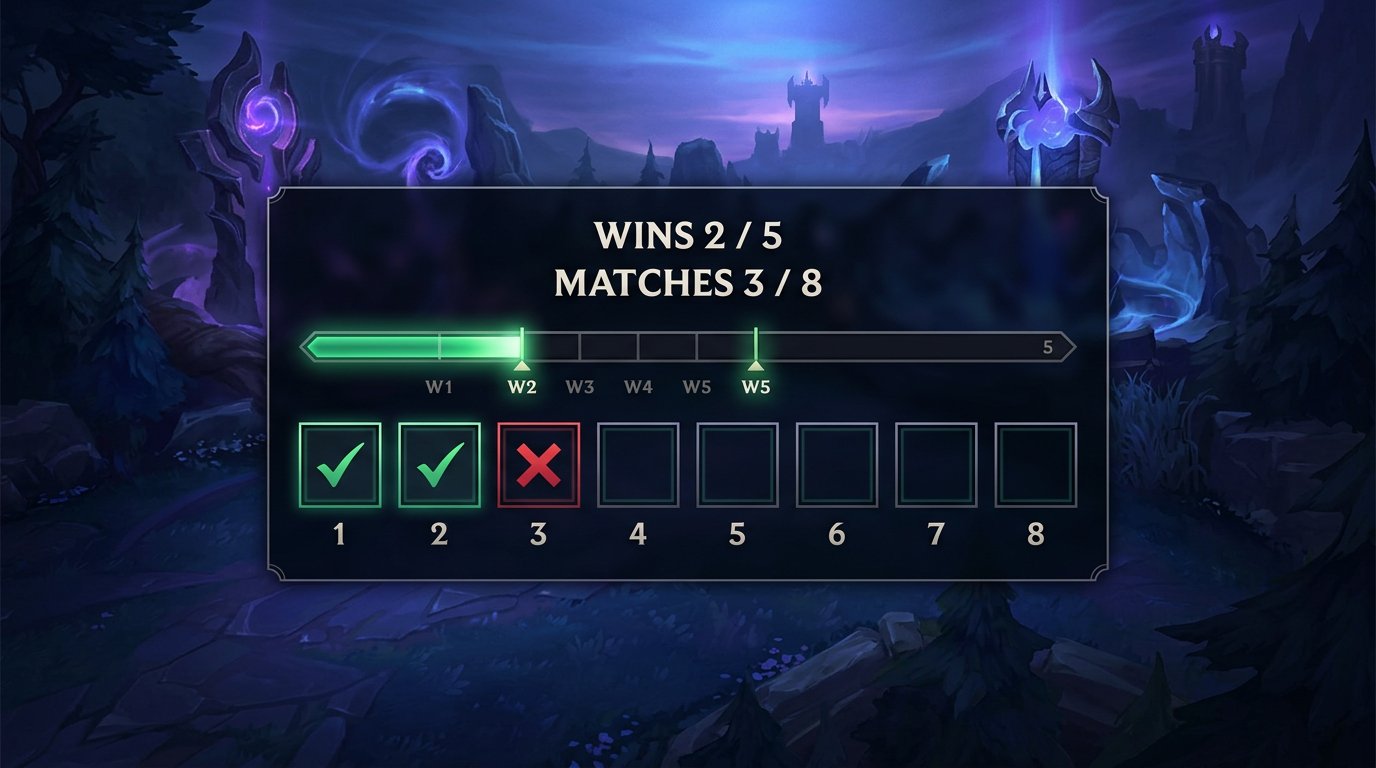
An OBS browser source is needed when a short line isn't enough. It's convenient for showing a progress bar, cells for completed matches, individual win and loss statuses, and an enlarged version of the challenge on the starting scene. The source is added to OBS as a page or widget and sized to fit the scene.
For viewers, a history of results is more useful than a decorative animation. Each counted game should occupy its own cell, and empty attempts should remain visible before the start. The downside of a browser overlay is that it depends on the page loading correctly, the connection, and the size settings in OBS.
Tailor the Overlay to the Specific Challenge Mechanic
For a game-limit format, show a block with wins, the number of counted matches, and cells for the entire attempt. Mark a win with one symbol, a loss with another, and leave future matches empty. Don't rely on color alone: add letters, icons, or labels so the result is clear at low video quality.
For a win streak, it's better to arrange cells in a row and clear them after a loss, if the rules say so. For a ranked format, a scale with a starting and target point is more useful than a row of matches. The downside of a detailed overlay is that it takes up space on the scene and can cover part of the game image.
Change the Data in Only One Place
Don't keep the counter separately in OBS, in the browser widget, in the stream description, and in bot messages. Choose one data source: a text file, a spreadsheet, a widget panel, or a separate page with challenge variables. The other elements should get the result from there or be updated in one clear order.
For manual tracking, a table with the match number, champion, queue, result, and a short note is convenient. Store the values for the overlay in a separate area. The downside of this scheme is that it requires discipline after every match: if you forget to log an entry, the history and the on-screen score will diverge.
Build a Step-by-Step Routine for After Each Match
Updating shouldn't depend on memory at the end of an emotional game. After the final screen, first check whether the match was counted. Then enter the result into the main data source, make sure the overlay has updated, and only then queue up the next game. The same routine every time reduces the number of errors.
- Check the result on the final screen.
- Determine whether the game counts toward the challenge under the pre-announced rules.
- Update the table, file, or widget panel.
- Make sure the new score has appeared on the scene.
- Briefly state the status and move on to the next game.
The downside of this ritual is that it adds a pause between matches. But an attempt with clear tracking is more important than immediately queuing up with an old result.
Add a Chat Command With the Current Status
Create a command like !challenge. In the response, state the goal, current progress, and where the full rules are located. A new viewer won't have to wait for the match to end or search for an explanation in chat messages. If the attempt spans several streams, add a link to a public results history.
Update the command at the same time as the overlay. Don't leave this to a moderator without access to the current data: they might accidentally state an old score. The downside of a chat command is that its text is easy to forget to update, and the bot will start broadcasting incorrect information.
Test Automation on a Test Scene
Automatic tracking is useful if the tool reliably receives completed matches and distinguishes the right queue from an uncounted one. Before going live, test data delay, remakes, role changes, playing a backup champion, client restarts, and connection drops. For such testing, it's better to use a test scene that viewers can't see.
Don't display an automatic counter without manual verification after the first games. One incorrect mark reduces trust in the format, especially if the success of the attempt depends on it. The downside of automation is that it's harder to set up, and match information may not appear immediately after the final screen.
Place the Panel Outside Critical Interface Elements
The counter should be visible during loading, in the match, and after the game, but it shouldn't cover the minimap, abilities, gold, objective timers, or important notifications. Check the scene at the resolution you're capturing in, and also in a reduced preview: a large block may look neat on a monitor and get in the way of a viewer on a phone.
During a match, a narrow horizontal panel in a free upper area usually works well. On the starting scene, you can enlarge it and add the full history. The downside of a large permanent overlay is that it takes up useful space and makes the game screen less readable.
Settle Disputed Situations Before They Happen
Before the start, state your decisions for common cases: an early remake, a client disconnect, a stream drop, a main champion ban, and a queue change. There's no need to write a rulebook for every rare event, but rules that could change the counter should be available before the first game. Post the full version in the description, channel panel, or a pinned message.
A rule announced before a disputed match looks fairer than a decision made after a loss. If a case outside the rules occurs, state the decision you've made, add a note to the history, and use the same approach going forward. The downside of strict rules is that they can't account for every technical glitch.
Let Chat Influence Secondary Decisions
Viewers can choose between pre-approved champions, a backup pick after a ban, the design of the next stage, or a secondary objective that doesn't affect the main score. It's better to run votes between matches, when they don't interfere with focus and don't delay the start of the game.
Don't give chat the right to cancel losses, add attempts after a failure, or change the goal to match the current result. Then the counter stops being an honest tracker, and the suspense disappears. The downside of votes is that they stretch out the stream, especially if you run them after every game.
Define the End of the Attempt in Advance
Before your first queue, decide what will happen after success or failure. Once the goal is met, you can end the challenge, start a separate stage on another role or champion, or move on to regular games. On failure, save the attempt history and schedule a new run on another stream or after a pre-announced break.
Don't extend the limit just because you were one win short of the goal. That devalues the matches viewers followed all stream long. If the attempt continues on the next stream, show a starting screen with the rules, the past history, and the current counter before your first queue.
Last Articles
What has changed in design and functionality We have updated the website to make working with it faster and more convenient. The main changes affect ..
Good afternoon, I've collected all the news during this time.: 1. The main news is that prices for twitch viewers have been greatly reduced, while Tw..
1. Use promo code "December2025" for a 15% discount for all our viewers2. We have reduced the base prices for our configurator and the most affordable..
Twitch services are working stably, so we are ready to cooperate with squads, resellers, service owners, bot owners, and many others.Individual te..
We have completely updated our Twitch viewer services, and they are now working stably. We only use high-quality IP addresses for the viewers.The ..
Hello everyone! Today, we are announcing a new feature—"Twitch Viewer Configurator". Now, you can customize any plan for your Twitch channel. Choo..
Greetings, I have compiled a guide for streamers, which will be very relevant at the moment. Now YouTube and twitch have disabled monetization from vi..
We have finally developed the APINow it will be more convenient for our partner sites to work with us.To update the maximum tariffs for YouTube, an up..
Due to the huge popularity of the partnership services and referral program, we have made a cooperation table. The essence is very simple: more live a..
Our Services for Streamers








Our Services for Content Creators






