
How to Keep the Valorant Custom Game Code Hidden from Viewers
Why You Shouldn't Show the Custom Game Code on Camera
An invite code lets a viewer get into the lobby without any personal contact with you. If the match is meant for subscribers, a team, or tournament participants, random players can take slots, throw off team balance, and distract moderation. A leak before the start is especially unpleasant: the code gets copied from a clip, recording, or screenshot even if you switched scenes quickly.
You need to hide not just the code itself, but the entire screen where it can be opened or copied. This includes the custom game lobby, the invite menu, messages containing the code, and browser windows if the code is shared via chat or a registration form.
Set Up a Separate Scene in OBS for the Lobby
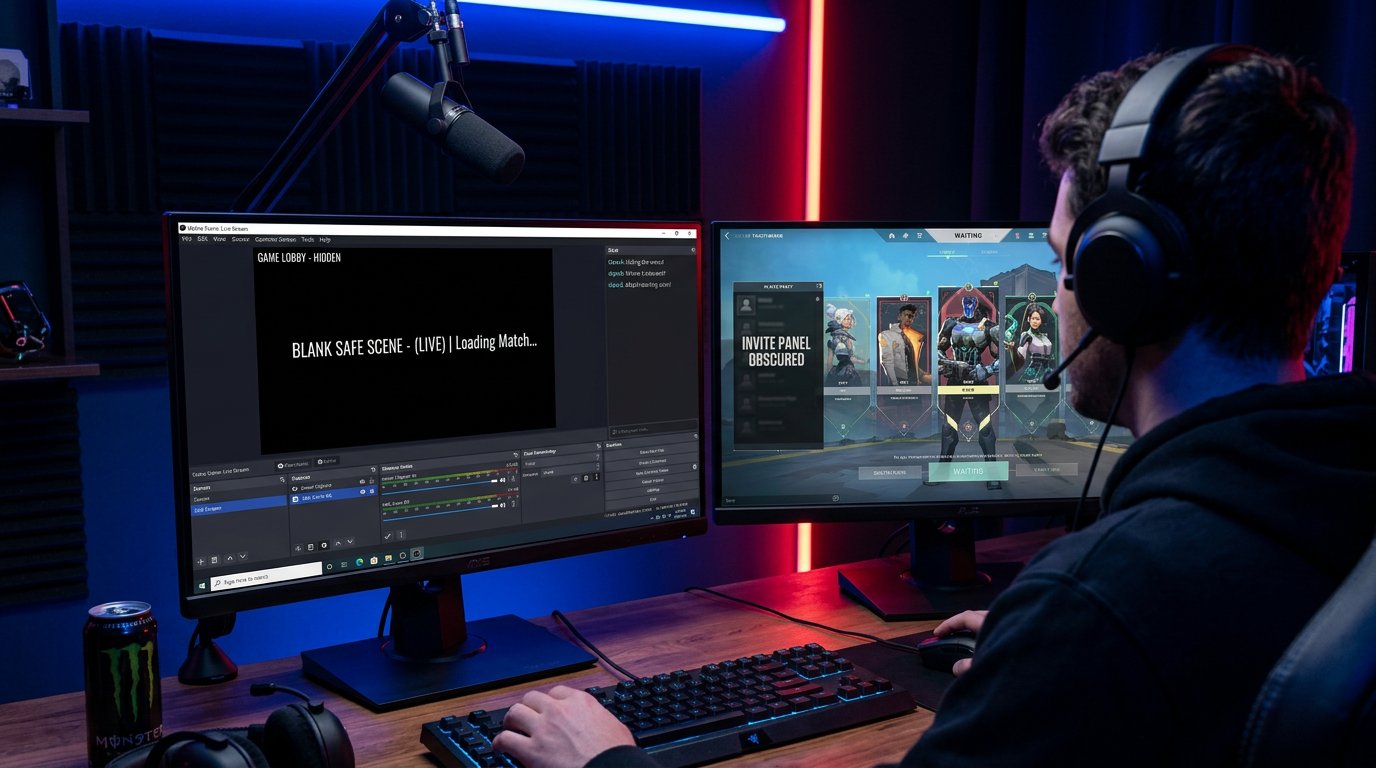
Don't show the lobby screen on the same scene as the match. Create a separate scene for setting up the custom game: no Valorant capture, no desktop capture, and no browser windows. While you create the lobby, copy the invite, and gather players, keep a standby screen, camera, or chat scene on stream.
The downside of this approach is that you'll have to switch manually and stay disciplined. One mistake with the active scene will still show the game interface. So it's worth assigning different hotkeys to the game scene and the safe standby screen, and checking them several times before going live.
Don't Use Full-Screen Capture for Valorant
Screen capture sends viewers everything that appears on your monitor: the game client, notifications, messengers, the browser, and accidentally opened folders. For streaming a match, it's safer to use window capture or game capture. That way, other windows won't end up on air if you leave Valorant to send invites to participants.
But window capture has a limitation: it doesn't hide elements inside the client itself. A code opened in the Valorant menu will be just as visible to viewers as it is to you. So you need to disable the game source or replace it with another scene before going into the custom match menu.
Cover Sensitive Areas with a Mask or Overlay
If the interface has a permanent area where the code or its copy button appears, you can cover it with an image or a colored block in OBS. The overlay must sit above the game source. Before going live, open the relevant menu and make sure the mask covers not only the code line but also any hints next to it.
This option has a clear downside: the game interface can change depending on resolution, window mode, and updates. The mask may shift or leave part of the characters visible. Don't treat it as your main protection. It works as an extra layer for when the lobby scene accidentally ends up on air for a few seconds.
Set a Sequence of Steps Before the Match Starts
The most reliable approach is to create the match and hand out invites before showing the game screen. Don't open the lobby "for a minute" so viewers can see who's already joined: the invite element may appear alongside the player list. Prepare the match first, then switch to the game scene only right before warm-up or the map begins.
- Switch the stream to a safe scene.
- Create the custom game and configure the settings.
- Copy the code and send it to participants outside public chat.
- Check the lobby roster and close the invite menu.
- Return to the game scene once only a safe screen remains on camera.
Share the Invite in a Private Channel
Don't post the code in the stream title, description, pinned message, or general chat. These places get indexed, end up in notifications, and remain accessible after deletion. For a regular roster, it's better to use a private team channel or direct messages. For subscriber matches, pre-selection helps: the participant list is formed in advance, and only the right group gets the invite.
The downside of personal messaging is that it takes time, and players may forward the code to each other. With open sign-ups, it's worth explaining the rules in advance: invites must not be shared, and a player who brings in an unregistered participant may be excluded from future matches.
Don't Say the Code Out Loud or Paste It into Visible Fields
The code can leak through more than just the image. Don't read it aloud during the stream and don't type it into a chat that viewers see on the overlay. Separately check recent message widgets, on-screen notifications, and browser history: if a participant replies to your message with the code, the text may appear on camera.
The clipboard itself isn't visible to viewers, but the risk appears with desktop capture or browser sharing. After sending the invite, it's best to close the tab, minimize the messenger, and avoid showing the screen until you're back in the game.
Use Delay Only as an Extra Measure
Stream delay reduces the chance that a viewer will instantly use a code shown by accident. It gives you time to notice the mistake and switch scenes. However, the broadcast recording, clips, and rewinding preserve the leak: a viewer can watch the fragment later, copy down the characters, and try to join while the lobby still exists.
The downside of delay is that it interferes with chatting with viewers, reacting to donations, and managing a match with viewers. Besides, it doesn't remove the need to change the lobby after the code has been shown. You shouldn't rely on delay alone.
Prepare Chat Moderation and Rules for Participants
Ask your moderators to delete messages with codes, invite links, and attempts to gather outside players into your lobby. It helps to add a rule to the chat description: match codes are not posted, and violations may lead to a ban. If you use bot commands on stream, don't create a command that hands out the invite to anyone who asks.
- Review player messages before displaying them on screen.
- Don't pin replies containing match login details.
- Disable or hide the chat widget on the lobby setup scene.
- Give a moderator the ability to delete messages quickly without waiting for your response.
What to Do If the Code Has Already Gone Out on Stream
Switch to a safe scene immediately and don't reopen the lobby hoping viewers didn't notice. Deleting the clip or message doesn't solve the problem: viewers may have saved the frame. The safest option is to close the current lobby and create a new invite. After that, check the participant roster and remove unfamiliar accounts before the match starts.
If the leak happened through chat, ask moderators to delete all repeats of the code, including messages with partially masked characters. Then find the cause: an open scene, the wrong capture source, a chat overlay, or a participant's message. You need to fix the actual source of the leak, otherwise a new code could end up on air the same way.
Last Articles
What has changed in design and functionality We have updated the website to make working with it faster and more convenient. The main changes affect ..
Good afternoon, I've collected all the news during this time.: 1. The main news is that prices for twitch viewers have been greatly reduced, while Tw..
1. Use promo code "December2025" for a 15% discount for all our viewers2. We have reduced the base prices for our configurator and the most affordable..
Twitch services are working stably, so we are ready to cooperate with squads, resellers, service owners, bot owners, and many others.Individual te..
We have completely updated our Twitch viewer services, and they are now working stably. We only use high-quality IP addresses for the viewers.The ..
Hello everyone! Today, we are announcing a new feature—"Twitch Viewer Configurator". Now, you can customize any plan for your Twitch channel. Choo..
Greetings, I have compiled a guide for streamers, which will be very relevant at the moment. Now YouTube and twitch have disabled monetization from vi..
We have finally developed the APINow it will be more convenient for our partner sites to work with us.To update the maximum tariffs for YouTube, an up..
Due to the huge popularity of the partnership services and referral program, we have made a cooperation table. The essence is very simple: more live a..
Our Services for Streamers








Our Services for Content Creators






