
Protection Against Stream Sniping in Fortnite: Stream, Game, and Chat Settings
What Counts as Stream Sniping in Fortnite
A stream sniper watches the broadcast and uses what they see in the match: the drop point, the map marker, the route, the squad composition, the weapons, the moment the queue is started. Their goal isn't always just to eliminate the streamer. A player may interfere with challenges, chase the team, deliberately throw near you, or try to get on screen for a chat reaction.
A single repeat encounter proves nothing. Matchmaking is affected by the mode, the matchmaking region, the time of the stream, and the number of players in the queue. A reason to tighten protection appears when several signs line up: a viewer writes about your drop before an opponent shows up, the same username regularly ends up nearby after the match starts, and the chat discusses the moment the ready button was pressed.
Enable Stream Delay in OBS
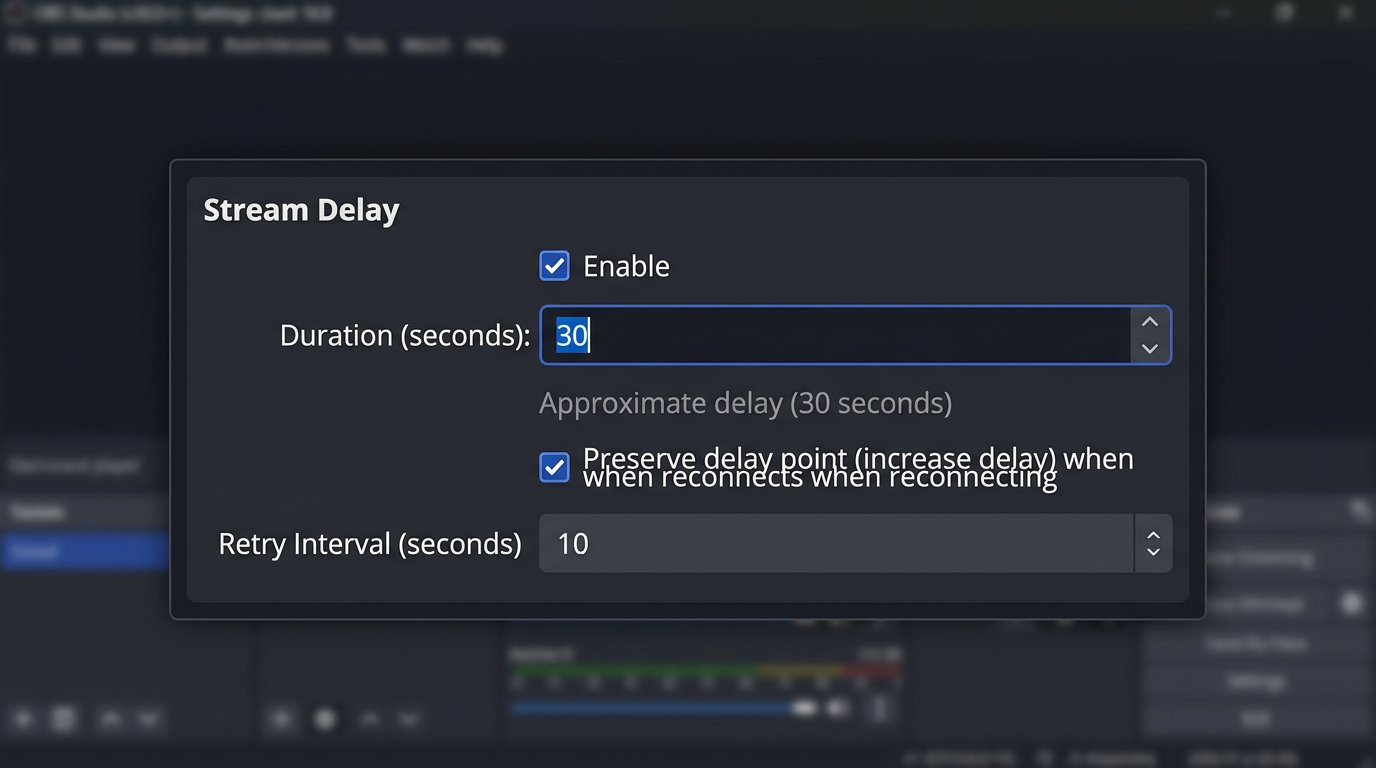
Fortnite has no stream delay setting: it's configured in OBS Studio or another program that sends the signal to the platform. In OBS Studio, open the settings, go to the advanced parameters, and find the stream delay section. Enable it, set the time, and if needed, preserve the delay on reconnect.
Delay doesn't prevent a stream sniper from getting into the match, but it deprives them of up-to-date information. The viewer will see the map, markers, and your decisions with a lag. The downside is obvious: chat reacts to events later, and answers to questions and reactions to donations stop being instant. The longer the delay, the more noticeable the gap between the game and the stream.
Check the Delay on the Viewer's Side
After setting it up, open the stream from a separate device or watch it through the stream recording. Don't rely on the OBS preview: it shows the signal before it's sent to the platform, not what the viewer receives. Compare an action in the game with the moment it appears on the second screen.
Also check the low-latency settings on the streaming platform itself. They can reduce the gap you were trying to create through the encoder. For ranked matches, tournaments, and repeated attempts to get into your lobby, it's better not to disable the delay. The downside of a constant delay is that it's harder to maintain a live dialogue with the audience.
Hide the Queue Start and Loading Screen
Stream snipers often sync their matchmaking not by the map but by the moment the queue is started. Don't show the screen where you press "Play," cancel the queue, change the mode, or return to the lobby. Prepare a separate scene in OBS with chat, a splash screen, replays of past moments, or neutral visuals, and switch to it before starting the queue.
Keep this scene up until the starting island or until the delay already makes syncing pointless. Don't announce the exact time of the next match and don't ask viewers to press queue at the same time as you. The downside is that part of the audience won't see the full game loop and may find such pauses drawn out.
Hide Your Display Name in Fortnite
Fortnite's settings include options related to displaying names. They help avoid revealing your usual username to viewers and random players in the match. You can also hide other players' names in the game interface: this reduces the chance that viewers will look up opponents via the kill feed, spectate screen, or elimination list.
Anonymity settings for regular matches and competitions may work separately, so it's worth checking them before streaming in the relevant mode. Such settings don't hide your behavior in the match and don't replace the delay. The downside of anonymity is that friends, viewers, and potential teammates have a harder time telling that they've met you specifically.
Limit Invites and Party Access
A hidden name won't protect you from someone who's already added as a friend or gets to you through an open party. In the social settings, limit the circle of people who can invite you, join the party, and see your in-game presence. For ranked play, keep access limited to friends or pre-selected teammates.
Check whether the party stays open after games with subscribers. Don't accept requests from unfamiliar accounts right before queuing: a viewer can use this to confirm your username, status, and lobby composition. The downside of closed social settings is that regular viewers have a harder time joining your squad, and co-streams have to be planned in advance.
Don't Show the Friends List and Notifications
Fortnite's social panel can reveal friends' usernames, their status, incoming invites, and lobby composition. Don't open it in the game capture unless necessary. If a request or invite does appear, don't discuss the sender on stream: such a reaction confirms to the viewer that they've found the right account.
Separately check notifications from the gaming platform, messengers, browser, and overlays. For streaming, it's safer to capture the specific Fortnite window rather than the entire desktop. That way, personal messages, pop-up notifications, and the friends list won't end up on screen. The downside is that during a stream it's harder to quickly reply to teammates and manage invites.
Close the Map and Markers Right After Deciding
An open map gives a stream sniper the most useful data: the drop point, the team's direction, marked targets, and movement pace. Don't keep it on screen longer than needed to decide. Close the map after choosing a marker, and don't discuss the route several times while the bus is still flying over the island.
Don't name the drop point before jumping and don't repeat it for viewers. This applies to quest objectives, spots with the loot you need, vehicles, vaults, and your position in the next zone. If your stream is built on breaking down decisions, show the route after the match, in a replay, or in a recording. The downside is that viewers have a harder time following the tactics in real time.
Don't Reveal Your Position by Voice
Map protection is useless if you immediately call out landmarks by voice. Don't say the exact location name, movement direction, number of opponents nearby, or time until rotation. It's also useful for teammates to speak more briefly: use pings, pre-agreed callouts, and short commands instead of a full description of the route.
When you need to open the map for a challenge or to assess the zone, switch to the waiting scene or do it as quickly as possible. Don't show the challenge list up close if it can reveal your next objective. The downside of this approach is that squad communication becomes less convenient, and teaching moments have to be explained after the episode.
Vary Your Modes and Don't Make Your Schedule Predictable
Even without precise syncing, you're easier to find if every stream happens in the same mode, at the same time, and with the same favorite drop point. If suspicious encounters keep repeating, change the playlist, alternate starting locations, and don't publish your full match plan in advance. Don't turn your ranked queue time into a fixed ritual.
Changing region shouldn't be your main defense. It may temporarily reduce queue overlaps, but a stream sniper can pick the same region, and higher network latency will hurt your shooting and movement. Only use a different region if the connection stays comfortable. The downside is that match quality and input responsiveness may get worse.
How to Tell Stream Sniping from Coincidence
A suspicious episode usually consists of several connected actions. A message about your drop point or route appears in chat, then a player ends up nearby shortly after the match starts, ignores normal loot searching, and follows the team. After being eliminated, they may write a phrase related to the stream's events.
Each sign on its own can be explained by coincidence. A player could have picked a popular location, heard gunfire, or recognized you by your username. But the combination of queue syncing, precise following, and chat messages is worth documenting. Don't accuse anyone on stream before reviewing the materials. The downside of a cautious approach is that the offender may not get the immediate reaction they're after.
Agree with Your Team on Information Protection
Delay won't help if a teammate streams without it, shows the map, or shares plans with viewers in voice chat. Before starting, agree not to name the current position, route, queue start time, or private lobby code until the match ends. Separately decide who accepts invites and answers questions about joining.
Don't add random viewers to your main squad during a ranked session, practice, or while completing difficult challenges. For games with your audience, set aside a separate block with clear rules. The downside of a closed roster is fewer opportunities for spontaneous games with subscribers, and the stream becomes less interactive.
Set Up Chat Rules and Moderator Workflows
In the channel rules, prohibit messages about your position, opponents, route, the contents of other people's streams, queue times, and attempts to get into the same match. Separately prohibit posting the usernames of suspected stream snipers and calling on chat to report them. Such messages give the offender attention and can lead to harassment based on a mistaken suspicion.
A moderator doesn't need to investigate the situation during a fight. Their job is to delete the message with up-to-date information, warn the author on a first violation, and restrict access on a repeat or clear coordination. The downside of strict moderation is that some viewers may see message deletions as overly harsh.
Which Messages to Delete Immediately
- Drop points, markers, routes, and the name of the current location.
- Messages about queue start times and requests to press queue at the same time.
- Data about your opponents from another stream or voice chat.
- Usernames of players from the current match if they're posted to look up an account.
- Calls to chase a player, send reports, or look them up on social media.
Ask moderators to save links to messages, clips, and timestamps in a separate communication channel. An action log helps identify who is systematically passing information rather than breaking a rule once. The downside of word filters is that they can hide ordinary messages if the bans are set too broadly.
Don't Make the Offender Part of the Show
During a match, don't name the suspected stream sniper by username, don't open their profile, and don't ask viewers to look up accounts. For such a player, a public reaction is often the goal itself. It's calmer to hide the game screen, stop the queue, change the format of the next match, or temporarily increase the delay.
A short explanation without details is enough for chat: there's a technical pause, the current match isn't being discussed. Don't argue with the offender and don't ask them to confess. The downside of this reaction is that viewers will notice the break in the usual pace and may start speculating, but that's safer than revealing your next moves.
Document Episodes and File a Report
Save the stream recording, clips, screenshots of messages, and the match time. If a Fortnite match replay is available, save the relevant fragment: it can show the player's route before meeting you. For a report, context matters — the start of the episode, the overlap with chat, and the repeatability of the behavior, not just the moment of elimination.
After the match, use the in-game report and choose the reason that matches the actual violation. In the comment, include verifiable details: the match time, the player's username, repeat encounters, chat messages, and whether you have a recording. A block limits direct contact through social features but doesn't prevent them from getting into general matchmaking or creating another account.
Separate Games with Your Audience from Important Matches
Open games with subscribers are good for socializing, but they carry a higher risk of hints, queue syncing, and deliberate interference. Ranked matches, practice, and attempts to complete difficult challenges are better done with a delay, a closed roster, a hidden queue screen, and limited social settings.
Announce the format of the stream block in advance: when you're playing with your audience and when you're not accepting invites and not showing the queue. The downside of this separation is that the stream requires a plan, and viewers won't be able to join at any moment.
What Set of Protections Is Enough
The minimum sufficient set for a regular stream is stream delay, a separate scene during queueing, hiding the map and markers, and chat rules with moderation of hints. If suspicious encounters repeat, add a closed party, restricted invites, a hidden name, and documentation of episodes.
Constantly hiding all gameplay, changing region, and completely refusing to interact with your audience is usually excessive. These measures are justified only during an important ranked session or in cases of systematic harassment. Their downside is that stream interactivity drops noticeably, and the game becomes less convenient for you and your team.
Last Articles
What has changed in design and functionality We have updated the website to make working with it faster and more convenient. The main changes affect ..
Good afternoon, I've collected all the news during this time.: 1. The main news is that prices for twitch viewers have been greatly reduced, while Tw..
1. Use promo code "December2025" for a 15% discount for all our viewers2. We have reduced the base prices for our configurator and the most affordable..
Twitch services are working stably, so we are ready to cooperate with squads, resellers, service owners, bot owners, and many others.Individual te..
We have completely updated our Twitch viewer services, and they are now working stably. We only use high-quality IP addresses for the viewers.The ..
Hello everyone! Today, we are announcing a new feature—"Twitch Viewer Configurator". Now, you can customize any plan for your Twitch channel. Choo..
Greetings, I have compiled a guide for streamers, which will be very relevant at the moment. Now YouTube and twitch have disabled monetization from vi..
We have finally developed the APINow it will be more convenient for our partner sites to work with us.To update the maximum tariffs for YouTube, an up..
Due to the huge popularity of the partnership services and referral program, we have made a cooperation table. The essence is very simple: more live a..
Our Services for Streamers








Our Services for Content Creators






