
How to Set Up Chat and Moderation for a GTA VI Stream After Release
Define the format of your GTA VI broadcast before you announce it
In the first days after release, viewers will come to GTA VI with different expectations. Some want a blind first reaction to the campaign, others want open-world exploration, and still others are interested in online if it's available. Don't mix these formats in a single promise: a viewer who came for a spoiler-free playthrough will be unhappy if the chat starts dictating the route and revealing content.
In the title, description, and pinned message, state the current mode: "blind first campaign playthrough," "exploring the open world after the story," or "online with viewers." If the plan changes during the stream, update the pin right away. The downside of this approach is that you'll have to keep an eye on your wording during the broadcast, but your audience will have fewer reasons to argue about the rules.
Separate the rules for campaign and online
The story campaign and online require different moderation. During a first playthrough, mission names, the names of characters not yet encountered, future districts, choices, cutscenes, and phrases like "after this the real stuff begins" are all dangerous. Even a hint without a direct recap can ruin a reaction to a scene.
In online, the main concerns are pushy leveling advice, service ads, selling currency and accounts, links to third-party sites, and invitations from strangers. If you plan to play with viewers, decide in advance how you'll select them and ban posting personal data and dubious offers in chat.
For the campaign, you moderate knowledge of future content; for online, you moderate safety and participant behavior. A blanket "no spoilers" ban is too vague: a moderator will have a hard time telling a random reaction from a deliberate plot reveal.
Post short rules in several places
Put the same short list in the description, the pinned message, and the automated greeting. Don't make viewers hunt for the rules in the channel panel or a long document. The wording should explain exactly what not to write and what happens on a repeat violation.
- Don't post spoilers about the plot, missions, characters, choices, or the ending of GTA VI.
- Don't name future missions, the order of events, hidden rewards, or ways to unlock content that hasn't been shown.
- Campaign hints are allowed only after the streamer directly asks for them.
- Don't post links, service ads, or offers to sell accounts, currency, or leveling.
- Don't spam, don't repeat the same question, and don't use caps to get attention.
- Don't insult viewers, moderators, stream participants, or the game's developers.
- Moderator decisions are not discussed in the main chat during the stream.
Strict rules will scare off some viewers who are used to actively giving hints. That's a clear downside of the first-playthrough format, but it's better than a constant conflict between those who want to watch blind and those who already know the game.
Set up chat modes before the first wave of viewers
Don't wait until messages become unreadable. Before you go live, check the link filter, repeat protection, restrictions for new accounts, the caps filter, and slow mode. On Twitch, it's useful to appoint moderators in advance and check the commands: /slow to slow down chat, /slowoff to restore normal pace, /uniquechat to remove repeated messages, /emoteonly for emote-only mode, and /clear to clear the visible feed.
Turn on slow mode during premiere scenes, difficult missions, cutscenes, a raid, or a sudden spike in viewership. Don't keep it on for the whole stream: chat will be safer, but viewers will have a harder time reacting quickly to funny and tense moments. Keep subscriber-only or verified-account-only mode as a reserve against mass spam — new viewers from recommendations will also be left out of the conversation.
Build a stop-word list for GTA VI plot spoilers
Automation is good at catching repeats, links, and known stop phrases, but it doesn't understand context. Don't add every word related to GTA VI to the blocklist: district names, cars, and mechanics may refer to things already shown on stream. Too broad a filter will start deleting normal messages and annoy your regular audience.
Build your plot list after the game launches and update it before each stream. The foundation is character names not yet encountered on the stream, names of future missions, operation code names, names of final chapters and unique items tied to late-game content. Take them from your own playthrough notes, messages removed by moderators, and recurring viewer phrasing. Don't add rumors and unverified leaks to the filter: they may turn out to be false, and chat will still discuss them using workarounds.
- Add a character's full name and common abbreviations if they unambiguously refer to future plot.
- For missions, add the exact name and common spellings without punctuation.
- Block phrases like "after the mission," "in the finale," "later it turns out," "you need to choose," if the platform lets you configure such phrases.
- Separately add the names of future bosses, betrayals, deaths, and endings once they start appearing in violations.
- Every few streams, remove words that are no longer spoilers after you've passed the corresponding part of the game.
It's best to enable the link filter right away: a regular viewer rarely needs to send a link in a first-playthrough chat. The downside is that you'll have to manually approve safe links if you allow sharing clips or official materials. The caps filter and duplicate-message protection are useful against spam, but they can catch emotional reactions, so start with a warning or a short timeout.
Prepare commands for recurring questions
Bot commands or quick moderator replies take some of the load off chat. Prepare short messages about the stream format, hint rules, current progress, online sign-ups, and the time of the next broadcast. Don't tie commands to unconfirmed plans: if the schedule changes, an old reply will quickly create extra questions.
- !spoilers — "First playthrough: we don't name future missions, characters, or plot twists."
- !hints — "Only post campaign tips after the streamer directly asks for them."
- !online — "Online sign-ups are announced separately; don't post accounts or invitations unless asked."
- !progress — "The current progress point is in the pinned message."
- !rules — "Spoilers, links, ads, spam, and insults are removed by moderation."
Don't trigger commands automatically too often. A chat filled with bot messages looks just as noisy as spam. It's better to reply with a command when a viewer asks or when the same question keeps repeating.
Appoint moderators and assign roles
On a first GTA VI stream, it's hard for one person to follow the story, read chat, complete a mission, and respond to spam at the same time. For a small viewership, one moderator who knows the rules and the game is enough. With a steady fast chat, it's better to have two: one watches for spoilers, the other for links, ads, spam, and conflicts. During a raid, premiere, or co-op online, a third person for organizational matters is useful.
- The story moderator removes spoilers, unsolicited hints, and messages with future mission names.
- The safety moderator handles links, ads, insults, filter evasion, and mass repeats.
- The communications moderator answers questions about format, progress, and rules with commands.
- For online, a separate person takes viewer requests and makes sure chat doesn't turn into a feed of game invitations.
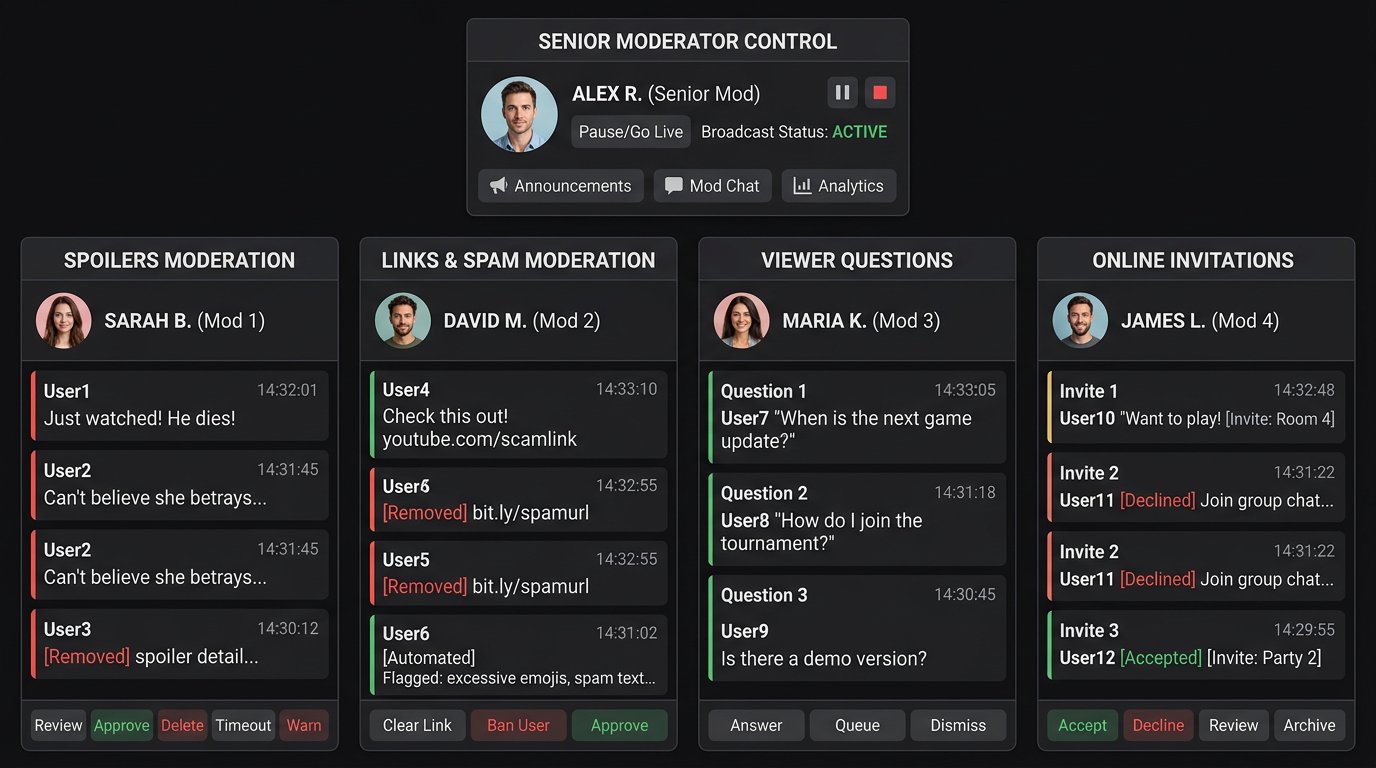
A large team without shared guidelines also creates chaos. If one moderator deletes any advice while another allows hints without a request, viewers start testing the boundaries and arguing with moderation itself. Appoint one senior moderator for disputed cases. Their decision stands until the end of the stream, and you can review it after the broadcast.
Give moderators a short brief before the stream
The brief shouldn't be a long multi-page instruction. It's enough to send it to the team chat before the start and update it when switching from campaign to online. The most important thing is to agree on what gets deleted immediately, what gets a warning, and which settings can be enabled without approval.
- Stream format: first playthrough, post-story exploration, or online with viewers.
- Current story point: who the streamer has already met, which districts and missions have already been shown.
- Forbidden topics: future characters, missions, endings, leaks, ads, links, account selling.
- Hints: fully prohibited or allowed only after the streamer's verbal request.
- Response scale: delete, warn, restrict chat, block.
- Emergency actions: who enables slow mode, the new-account filter, and emote-only mode.
- Communication with the streamer: one short code message for an urgent chat mode change.
The downside of the brief is that it needs updating as you progress, otherwise a moderator might delete discussion of content that's already been revealed. But without this check-in, the team will be making decisions blindly.
Use a clear scale of restrictions
A random remark about a scene just shown and deliberate spam with the ending shouldn't get the same response. A consistent scale helps moderators act quickly and helps viewers understand the boundaries without long public proceedings.
- Delete the message — for an accidental spoiler, caps, a repeated question, or a first unsolicited hint.
- Short chat timeout — for a repeat violation after a reminder.
- Long timeout — for persistent spoilers, insults, spam, and filter evasion.
- Block — for ads, threats, mass posting of plot leaks, and suspicious links.
Don't talk through every ban on voice during a mission. If chat noticed a deletion, it's enough to repeat the rule once. Complete silence can look like random moderation, but a long argument gives the offender attention and distracts from the game.
Separate release discussion from platform conflicts
In the first weeks, viewers will argue about performance, graphics, controls, price, comparisons with past installments, and availability on different platforms. Such topics can stay in chat if the conversation is related to what's happening on stream and doesn't turn into a stream of personal attacks.
Don't ban negative opinions about the game entirely. Criticism of the interface, technical issues, mission pacing, or controls is a normal reaction to a release. What should be stopped is insults, endless platform wars, and attempts to derail the stream with the same provocation. Moderate the form of the conversation, not the opinion about the game.
Prepare a plan for a raid and a spike in viewership
A recommendation, a raid, or a viral clip can bring a large audience in the middle of a story scene. At that moment, you can't simultaneously play a mission, explain the rules, and manually configure protection. The team should follow a pre-agreed procedure.
- Enable slow mode when identical messages flood in.
- Pin a reminder about the first playthrough and the spoiler ban.
- Switch moderators to checking links, repeats, and new accounts.
- During mass spam, temporarily restrict messages from new users.
- Don't read provocations aloud while moderators are already handling the offenders.
- After the spike, gradually disable extra restrictions and check whether the spam has returned.
Emergency mode slows down normal conversation and can hide some of the live reactions from new viewers. So don't leave restrictions on out of habit: after a raid, chat should return to the format you promised in the announcement.
Choose moments to talk with chat
During cutscenes, dialogues, and difficult missions, say outright that you'll read chat after the episode. This reduces the flow of hints and attempts to get attention through spam. Moderators find it easier to remove violations when the rule was stated shortly before an important scene rather than hidden only in the description.
It's best to take breaks for chatting between missions, after unlocking a new district, or before switching from campaign to online. At those moments, you can discuss mechanics already shown, answer questions about the format, and clarify the rest of the stream plan. The downside is that some instant reactions will go unanswered, especially in a fast-paced playthrough. After the broadcast, review the reasons for deletions: they'll show which stop words, commands, and rule wording need adjusting before the next stream.
Last Articles
What has changed in design and functionality We have updated the website to make working with it faster and more convenient. The main changes affect ..
Good afternoon, I've collected all the news during this time.: 1. The main news is that prices for twitch viewers have been greatly reduced, while Tw..
1. Use promo code "December2025" for a 15% discount for all our viewers2. We have reduced the base prices for our configurator and the most affordable..
Twitch services are working stably, so we are ready to cooperate with squads, resellers, service owners, bot owners, and many others.Individual te..
We have completely updated our Twitch viewer services, and they are now working stably. We only use high-quality IP addresses for the viewers.The ..
Hello everyone! Today, we are announcing a new feature—"Twitch Viewer Configurator". Now, you can customize any plan for your Twitch channel. Choo..
Greetings, I have compiled a guide for streamers, which will be very relevant at the moment. Now YouTube and twitch have disabled monetization from vi..
We have finally developed the APINow it will be more convenient for our partner sites to work with us.To update the maximum tariffs for YouTube, an up..
Due to the huge popularity of the partnership services and referral program, we have made a cooperation table. The essence is very simple: more live a..
Our Services for Streamers








Our Services for Content Creators






