
Anonymous admin mode in a Telegram group
What anonymous admin mode does
Anonymity is a separate admin right in a Telegram group. Once it is enabled, new admin messages in the group are sent on behalf of the group rather than the personal account. Members see the group's name and avatar as the sender.
The mode is suitable for announcements and replies from the moderation team. For example, a warning about a rule violation will look like a message from the group. The downside: it is harder for members to tell exactly who wrote the reply, especially if there are several anonymous admins.
Who can enable anonymity
The group owner can enable anonymity for themselves and for other admins. An admin with the right to appoint new admins can configure this right for a person they appoint themselves, if the corresponding setting is available to them.
Changing the rights of an already appointed admin depends on permissions and on who appointed them. If you cannot open the needed card or change the toggle, it is easier to ask the group owner. A regular member will first need admin rights.
Where to find the setting on phone and computer
On Android, iPhone, and in Telegram Desktop, the setting is located in the admin rights card. Button names and menu locations may differ slightly across app versions.
- Open the group and tap its name at the top of the chat.
- Go to group management via the edit button, menu, or pencil icon.
- Open the "Administrators" section and select the person you need.
- Enable the "Remain Anonymous" right and save the changes.
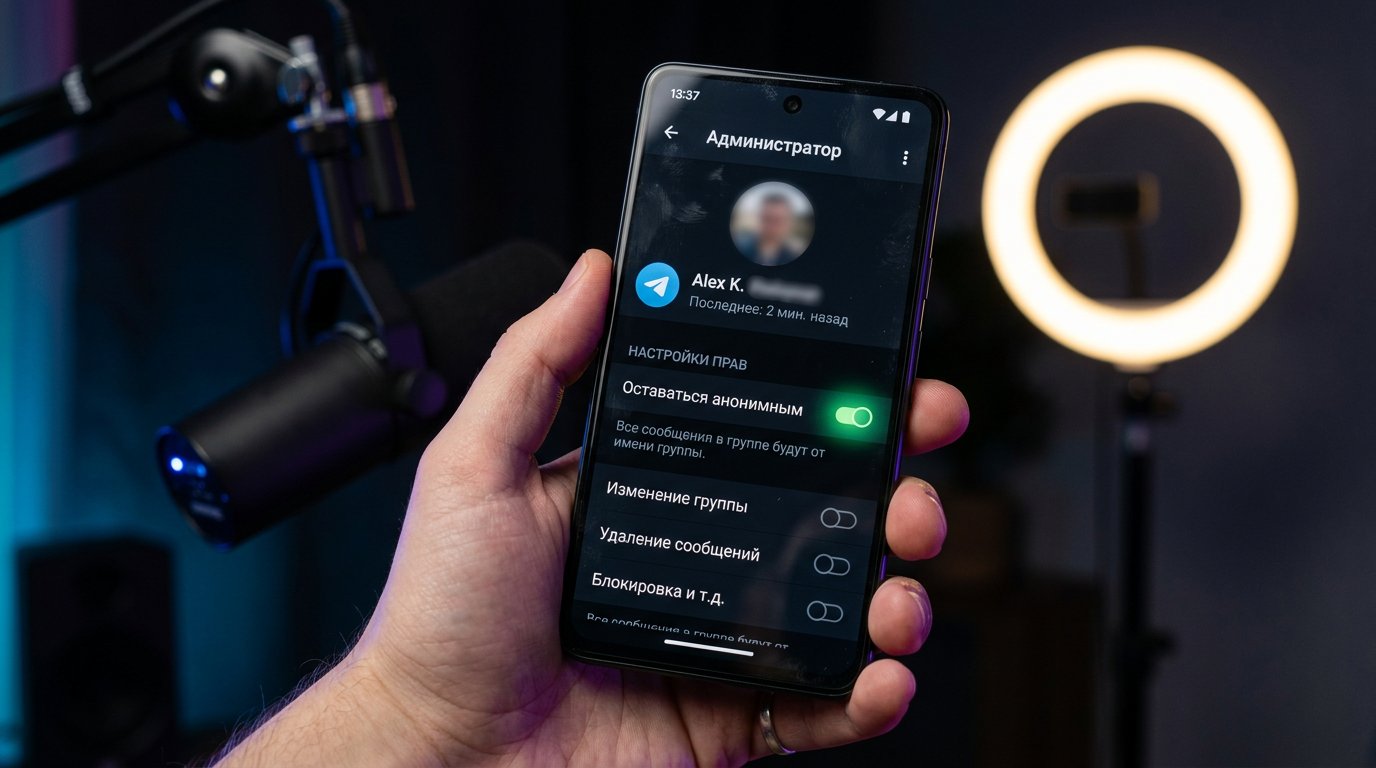
How to appoint a new anonymous admin
If the person is not yet in the admin list, they need to be added via the "Administrators" section. In the appointment card, select the required permissions, enable "Remain Anonymous," and confirm the changes.
The toggle itself does not grant the right to delete messages or block members. For example, a moderator who needs to hide spam will separately need the right to delete messages. Extra permissions do not have to be granted.
How to check the setting after enabling
After saving the rights, it is enough to send a short new message to the group. The group name should be displayed as the sender. It is more reliable to view the result from a regular member's account or ask a member to check it.
A separate group is suitable for testing: in an active chat, a test post may distract the audience. If the check takes place in a working group, the message can be made useful, for example by announcing the time of the next stream.
What happens to old messages
Enabling the mode does not automatically change the author of previous messages. Posts sent from a personal account may remain in the history with the admin's name and a link to their profile.
Before switching to anonymous sending, it is worth checking old announcements, replies, and pinned posts. For example, a caption like "I'm the new moderator" in a previous message may link the account to the role. Deleting such a post will remove part of the discussion context, so it is important to assess whether the group needs it.
What anonymity hides from members
The mode hides the personal account as the sender of new messages in the group, but does not guarantee full anonymity. The author can sometimes be guessed from their speaking style, the time they appear in the chat, or details known to only one person.
For example, the phrase "On my stream yesterday" may give the admin away if members know who on the team went live. Neutral wording reduces the risk of such clues but makes communication less personal.
What the owner and other admins see
Sending on behalf of the group does not mean that actions are hidden from the management team. Admins with access to the recent actions log may see information about events in the group. The available records and details depend on the action and the admin's rights.
Therefore, the mode should not be used as a way to hide work from the owner. If confidentiality within the team matters, access to management and the log is better discussed separately. Restricting access, however, can make it harder to sort out moderation mistakes.
How several anonymous admins can work together
The right is enabled for each admin separately. When the mode is active for several people, their messages look like messages from a single group. This helps run the chat on behalf of the team but makes personal replies and handover of unfinished tasks more difficult.
Requests can be distinguished with a role signature: for example, "Moderation" for warnings and "Support" for access questions. Such a signature clarifies the content but does not change the rights. A personal name instead of a role makes the author recognizable and partly cancels out anonymity.
What rights an anonymous moderator needs
Anonymity changes how messages are sent but does not replace the other administrative rights. Deleting messages, blocking members, and pinning posts depend on separate settings in the admin card.
For example, an assistant who only publishes announcements on behalf of the team may not need to block members. The flip side of limited rights is that a complex complaint will have to be passed to another admin.
Does the setting apply in other chats
Anonymity applies to a specific admin in a specific group. If the same person moderates another group, the right must be configured separately there. A message in another group may immediately reveal the sender's personal profile.
In private chats, messages still come from the person's account. The group setting also does not change the visibility of the phone number, photo, and other profile data: their privacy is checked separately in Telegram settings.
How the mode relates to channel comments
Comments on channel posts work through a linked discussion group. Admin rights in it are configured separately from rights in other groups. Anonymity in one group does not automatically carry over to another channel's discussion.
For a personal reply in a discussion group, you may need to disable anonymity or use another account. In both cases, members will be able to see the sender's profile. Before discussing a sensitive topic, it is better to check the available sending method in the specific group.
How anonymity differs from choosing a sender
In some Telegram chats, you can choose a sender, such as a channel. This is a separate feature, not the "Remain Anonymous" right in the admin card. Availability of the choice depends on the chat and the account.
If there is a sender icon next to the input field, it is worth checking before testing. A message on behalf of a channel does not prove that admin anonymity is enabled: to verify, you need the rights setting in the group itself.
Why a bot may not accept the command
Some bots need the sender's personal account to verify access or execute a command. When sending on behalf of the group, the command may not work or may return an error. The specific behavior depends on the bot and its settings.
For example, a bot may not recognize an admin who sent a service command anonymously. The bot's instructions will help clarify the requirements. To check, you can temporarily disable anonymity, but a command from a personal account will show members the sender's profile.
Why the toggle is not visible or unavailable
First, check whether the admin card is open in the settings of the correct group rather than the general information screen. A regular member does not have such a set of rights. An admin without sufficient permissions may also not have access to change someone else's card.
If the section is found but the toggle does not appear, it helps to update Telegram and open the settings again. The interface may differ between versions. If the change is still unavailable, the group owner's help will be needed.
Why a new message shows a personal profile
The reason may be that the right was enabled for the wrong admin, in the wrong group, or the change was not saved. The result should be checked on a new message: old posts are not suitable for such a test.
It is also worth checking the selected sender, if such a choice is available in the chat, and viewing the message from a member's account. If the setting looks correct, you can reopen the chat, check the rights in another Telegram app, or ask the group owner to look at the admin card.
How to disable anonymous mode
In group management, open the admin list, select the person you need, turn off the "Remain Anonymous" right, and save the changes. Then send a new message and check the sender from another account.
Disabling is suitable for personal support or for working with a bot that needs a personal account. The downside is that new messages may again lead members to the admin's profile. Previous messages on behalf of the group should not be considered automatically reformatted.
Last Articles
What has changed in design and functionality We have updated the website to make working with it faster and more convenient. The main changes affect ..
Good afternoon, I've collected all the news during this time.: 1. The main news is that prices for twitch viewers have been greatly reduced, while Tw..
1. Use promo code "December2025" for a 15% discount for all our viewers2. We have reduced the base prices for our configurator and the most affordable..
Twitch services are working stably, so we are ready to cooperate with squads, resellers, service owners, bot owners, and many others.Individual te..
We have completely updated our Twitch viewer services, and they are now working stably. We only use high-quality IP addresses for the viewers.The ..
Hello everyone! Today, we are announcing a new feature—"Twitch Viewer Configurator". Now, you can customize any plan for your Twitch channel. Choo..
Greetings, I have compiled a guide for streamers, which will be very relevant at the moment. Now YouTube and twitch have disabled monetization from vi..
We have finally developed the APINow it will be more convenient for our partner sites to work with us.To update the maximum tariffs for YouTube, an up..
Due to the huge popularity of the partnership services and referral program, we have made a cooperation table. The essence is very simple: more live a..
Our Services for Streamers








Our Services for Content Creators






