
Mandatory Phone Verification for Twitch Chat Messages
What phone verification changes in chat
Requiring a confirmed number restricts message sending for accounts that haven't passed the required verification. Such viewers will still be able to watch the stream, read chat, follow the channel, and use Twitch. The restriction only appears when they try to send a message in chat.
This setting makes mass registration of throwaway accounts, advertising spam, and simple bot raids harder. Phone verification does not replace moderation. A rule-breaker can use an already verified profile, so AutoMod, banned words, timeouts, bans, and active moderators are still needed.
When requiring a number helps and how it gets in the way
Phone Verification is useful for recurring spam, abusive raids, waves of identical messages, and attempts to quickly return to chat with new accounts after a ban. For an attacker, creating each new profile becomes harder.
The downside of the rule is straightforward: some regular viewers won't want to link a number to Twitch just to send one message. On a small channel, this can reduce chat activity. For an international audience, there may be issues with code delivery, region, or mobile carrier.
If attacks are rare, you can enable the restriction during a raid or spam wave. A permanent strict mode is needed when regular moderation can't handle a recurring stream of new accounts.
Where Chat Verification is located
Open Twitch under the channel owner's account. Click the avatar in the top right corner, go to Creator Dashboard, then in the left menu open Settings and Moderation.
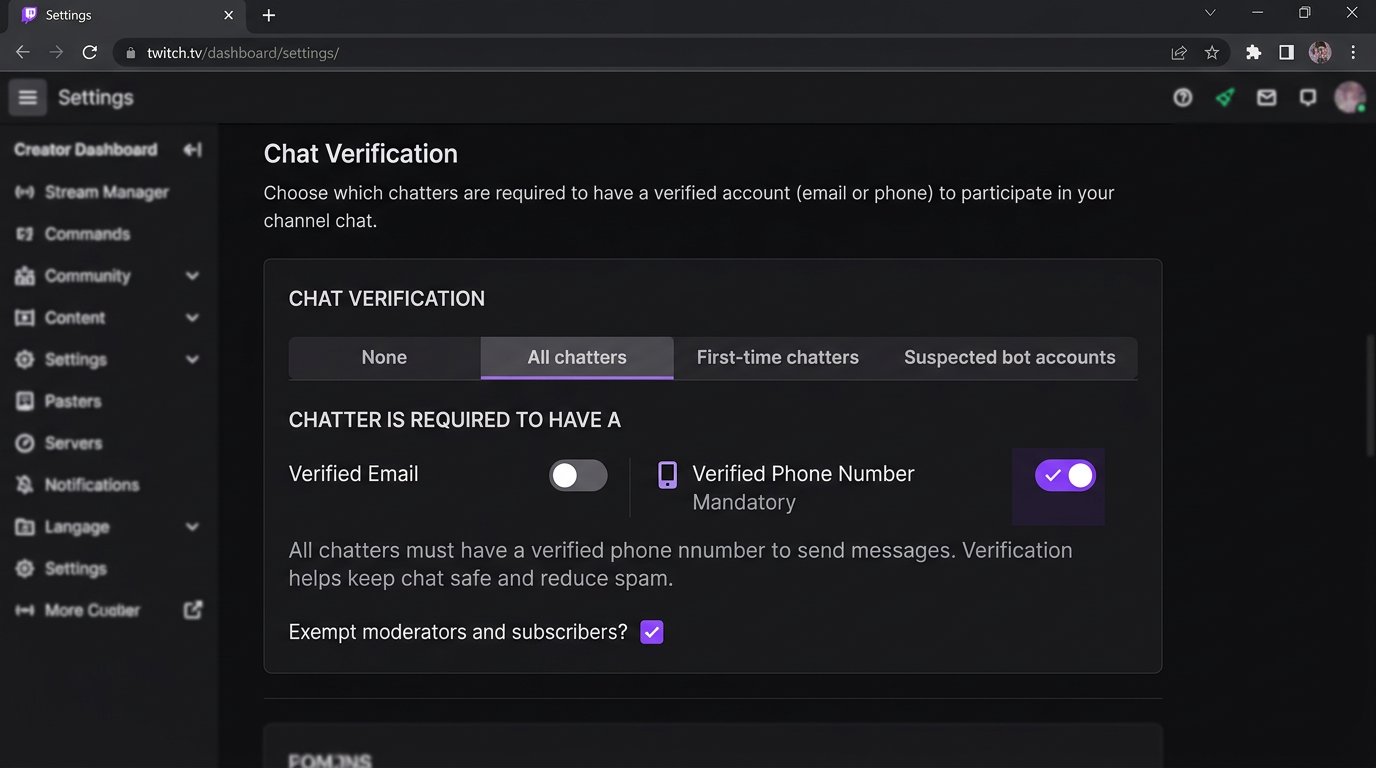
Find the Chat Verification block. It contains separate Email Verification and Phone Verification settings, as well as role exemptions. In the English interface, the path looks like this: Creator Dashboard → Settings → Moderation → Chat Verification.
The setting applies to a specific channel's chat, not to watching the stream. If you manage multiple channels, you need to set verification in each channel's dashboard.
How to enable mandatory phone verification for everyone
- Go to Creator Dashboard → Settings → Moderation.
- Open the Chat Verification block.
- In the Phone Verification row, open the list of levels.
- Select All chatters.
- Check the exemptions for moderators, VIPs, and subscribers.
After you make a selection, the value is applied in the channel settings: there is no separate save button in the Chat Verification block. To test the rule, open chat with a test account that has no confirmed number.
Viewers who have already confirmed a phone on their Twitch account don't need to do anything. For accounts without a number, the platform will show a requirement to complete verification the next time they try to write in chat.
Phone Verification levels and how exemptions work
The items in the Phone Verification list don't set different ways to confirm a number; they set the conditions under which a viewer can write without one. Names may differ in the Russian localization, so rely on the English labels.
- None — phone verification is disabled. Viewers without a confirmed number can write. Downside: there is no barrier for new spam accounts.
- All chatters — every viewer who wants to write in chat must confirm a phone, except roles with separately enabled exemptions. Downside: this is the highest barrier for new real viewers.
- Chatters with verified email — a viewer with a confirmed email gets the ability to write without phone verification. A number will be required for those whose email is not verified. Downside: a confirmed email is easier to create than a number, so protection is weaker than in All chatters mode.
- Chatters who have been following for — viewers who have followed the channel for at least the selected period can write without a phone. Everyone else will need a number. Downside: a pre-warmed or purchased old account may pass this filter.
For mandatory phone verification for everyone who writes, select All chatters. The verified email or follow-duration mode lowers the barriers for your regular audience but leaves more ways to bypass the restriction.
How to choose the follow duration
In Chatters who have been following for mode, after you select the level, a duration appears that the viewer must have been following the channel for. The list offers the following values: 10 minutes, 30 minutes, 1 hour, 1 day, 1 week, 1 month, 3 months, and 6 months.
A short duration filters out accounts created right during a raid but has almost no effect on old bots. A long duration restricts spam more strongly, but it won't let new viewers participate in the conversation without a number. This option is convenient as a compromise, but it is not the same as mandatory phone verification for everyone.
Exemptions for VIPs, subscribers, and moderators
Roles don't always bypass the requirement automatically. Their access depends on the Exempt VIPs, Exempt Subscribers, and Exempt Moderators settings or their translated labels in the interface. If the exemption for a role is enabled, a participant with that role can write without phone verification. If it is disabled, the selected Phone Verification level applies to them.
Before enabling All chatters, check these items separately. If protection is needed right during a raid, broad exemptions can weaken the filter: a compromised account with a role will be able to write without a number.
The downside of a mode without exemptions is that moderators, VIPs, and subscribers will also have to confirm a phone. Exemptions make chat more convenient for your team and regular viewers but reduce the strictness of protection.
What a viewer without a confirmed number will see
A viewer without the required verification will be able to open the stream and read messages. When they try to send a message, Twitch will show a notification that chat requires phone confirmation, or it will offer an available way to meet the condition of the selected level.
To lift the restriction, the user needs to open their Twitch account settings, add a number, receive a code, and enter it on the platform. If Chatters with verified email mode is selected, confirming the email is enough. In follow-duration mode, the viewer can confirm a number or wait until their follow time on the channel reaches the set duration.
A confirmed number is not displayed to the channel owner, moderators, or other viewers. The channel cannot confirm a number manually. Don't ask a viewer to send their number in chat, direct messages, or Discord: this won't lift the restriction and will create a risk for their data.
What happens when you enable the setting during a stream
Messages already sent are not deleted or changed. Verification only affects new attempts to write in chat after the rule is applied.
Viewers who are in chat at the moment you enable it will not be forcibly disconnected from the stream and can continue reading the conversation. But an account without the appropriate verification won't be able to send its next message until it confirms a number or meets another condition of the selected level.
Don't expect that switching the rule will instantly stop an ongoing wave: messages sent before the setting was applied will remain in chat. Along with enabling Phone Verification, use timeouts, bans, and chat modes if spam continues.
How to check that the restriction works
- Prepare a test account without a confirmed phone.
- Make sure it doesn't have a moderator, VIP, or subscriber role with an enabled exemption.
- If Chatters with verified email mode is selected, separately check an account with an unconfirmed and a confirmed email.
- Open the channel chat in another browser or a private window.
- Try to send a message.
- Check that instead of publishing the message, Twitch shows a requirement to confirm a phone or meet the condition of the selected mode.
After confirming the number, refresh chat and repeat the test. The message should be sent if no other restrictions apply to the account: a ban, a timeout, followers-only mode, or subscribers-only mode.
Don't test the rule with the channel owner's account. Its number may have been confirmed long ago, and some restrictions work differently for the owner and moderators than for a regular viewer.
Does verification work in mobile chat and other formats
The requirement is checked on Twitch's side, so it applies to the channel chat not only in a browser but also in the official mobile app. A viewer without the required verification will see the restriction when trying to send a message from their phone, just as in web chat.
The setting applies to channel chat messages during a live stream and outside a stream if chat is available. It does not control direct messages, comments on third-party platforms, a Discord server, or chat embedded in a third-party service.
Twitch doesn't have a separate standard "premiere chat" format with independent settings, as some video platforms do. If a shared chat, third-party widget, or integration is used, test the rule with a test account: the external interface may show the notification differently, even though the ability to send messages is restricted by the channel's rules.
Phone verification and email verification
Email Verification is configured separately in Chat Verification. Email confirmation does not replace phone confirmation when All chatters is selected for Phone Verification. These are different settings with different strictness.
Don't enable both restrictions just because they are available. Verifying both email and phone at the same time makes life harder for spammers but adds steps for regular viewers. The downside of this combination is that more people may give up on sending their first chat message.
If spam is rare, AutoMod, a banned-words list, and active moderators may be enough. If the problem is specifically mass new accounts, phone verification provides a stronger barrier.
Why a viewer can't confirm a number
If the code doesn't arrive, the viewer should check the number and country code, wait for SMS delivery, and request it again after a pause. Messages may be delayed or blocked by the carrier. If service SMS messages don't arrive from other platforms either, the problem may be in the phone settings or with the carrier.
When Twitch reports that the number is already linked to another account, the viewer needs to log in to that profile and change or remove the number in settings. If they don't have access to the old account, the issue is resolved through Twitch support after verifying ownership of the account.
In some regions or with some carriers, verification may be unavailable. The channel owner and moderators cannot bypass this restriction for a viewer. If a noticeable portion of your live audience runs into the problem, temporarily switch the rule to a more lenient level.
What to check if the restriction doesn't work
Go back to Creator Dashboard → Settings → Moderation and make sure Phone Verification is not set to None. Then check the selected level and the role exemptions.
Chatters with verified email does not require a phone from a viewer with a confirmed email. Chatters who have been following for does not require a number from a follower who has reached the selected duration. These levels cannot be used to enforce mandatory phone verification for all chat participants.
Test the rule with a new account without a number, without a confirmed email, without following for the required duration, and without roles on the channel. If the requirement still doesn't appear, take screenshots of the Chat Verification block and the chat notification to contact Twitch support.
How to loosen or disable the phone requirement
Go to Creator Dashboard → Settings → Moderation → Chat Verification. In the Phone Verification list, instead of All chatters, select Chatters with verified email or Chatters who have been following for and set the desired follow duration.
To remove the number requirement entirely, select None. After that, viewers will be able to write without a confirmed phone if no separate email verification, followers-only mode, subscribers-only mode, timeout, or ban applies to them.
The downside of disabling it is obvious: new accounts will again be able to get into chat faster. If the cause of the spam hasn't been addressed, keep AutoMod, word filters, and active moderation in place.
Last Articles
What has changed in design and functionality We have updated the website to make working with it faster and more convenient. The main changes affect ..
Good afternoon, I've collected all the news during this time.: 1. The main news is that prices for twitch viewers have been greatly reduced, while Tw..
1. Use promo code "December2025" for a 15% discount for all our viewers2. We have reduced the base prices for our configurator and the most affordable..
Twitch services are working stably, so we are ready to cooperate with squads, resellers, service owners, bot owners, and many others.Individual te..
We have completely updated our Twitch viewer services, and they are now working stably. We only use high-quality IP addresses for the viewers.The ..
Hello everyone! Today, we are announcing a new feature—"Twitch Viewer Configurator". Now, you can customize any plan for your Twitch channel. Choo..
Greetings, I have compiled a guide for streamers, which will be very relevant at the moment. Now YouTube and twitch have disabled monetization from vi..
We have finally developed the APINow it will be more convenient for our partner sites to work with us.To update the maximum tariffs for YouTube, an up..
Due to the huge popularity of the partnership services and referral program, we have made a cooperation table. The essence is very simple: more live a..
Our Services for Streamers








Our Services for Content Creators






