
Admin signatures in a Telegram channel: setup and verification
What admin signatures show
A signature adds the name of the administrator who posted it to a channel publication. The post stays in the channel feed, but readers see which account it was sent from. If you run a channel with several authors, this helps distinguish posts by hosts, editors, and invited specialists.
The downside of this setting is that the administrator's name becomes visible to the audience. For a team that prefers to speak only on behalf of the channel, this may be undesirable.
How to enable signatures on Android
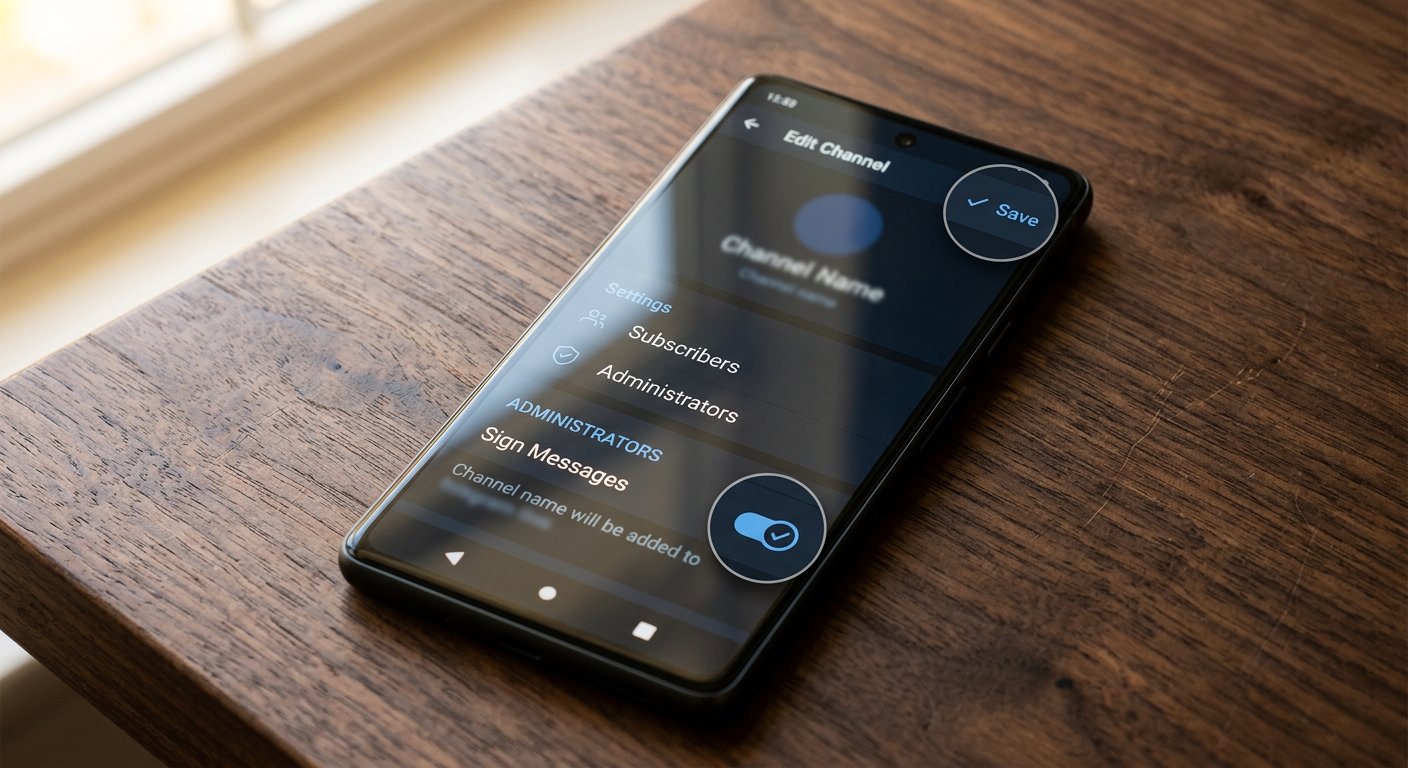
Open the channel and tap its name at the top of the screen. In the channel profile, tap the pencil icon to go to editing. Turn on the "Sign messages" toggle, then tap the checkmark to save.
After that, publish a test post directly from the channel. The setting applies at the channel level: you don't need to enable it separately in each publication's editor.
How to enable signatures on iPhone
Open the channel, tap its name or avatar, and in the profile select "Edit." On the editing screen, turn on "Sign messages" and tap "Done." Then check how it displays on a new post.
Button names may differ depending on the app's language. In the English interface, the relevant item is called "Sign Messages."
How to enable signatures on a computer
In Telegram Desktop, open the channel, tap its name, and go to management via the three-dot menu or the edit button. In the channel management section, turn on "Sign messages" and save the changes.
If you're using the web version or a separate macOS app rather than Telegram Desktop, the menu may look different. Look for the setting in the channel editing itself, not in the general account settings.
What permissions are needed for setup
The channel owner or an administrator with the right to change channel info can change this parameter. The ability to publish messages is not enough for this: an editor may have access to posts but not to settings.
If the edit button is unavailable, the owner can check the member's rights in the administrators section. Granting a full set of rights just to enable signatures is not necessary.
How to verify the result
After saving the setting, publish a short post manually and open it from a regular subscriber's account. The name of the publishing administrator should appear under the message. If profile linking is enabled, you should also tap the signature and check which account opens.
On a team, it's best to repeat the check for each publishing administrator. One test post doesn't show which names the audience will see on the others.
Which name appears in the signature
Telegram takes the administrator's name from their profile. There is no separate field for a custom signature on each post in the channel settings. So before publishing, check the first and last name in the profile and make a test post.
You can change the name in the profile settings by editing the account data. The downside of this approach is that the new name is used not only for the channel but also elsewhere in Telegram, including private chats.
How to choose names for the team
Signatures should distinguish people: if several editors use the name "Admin," the reader won't understand who posted. It's more convenient to agree on names or pseudonyms by which members can be told apart, and to check them on test publications.
A pseudonym helps avoid revealing a real name but may be unclear to a new audience. If it's important to introduce a host or specialist, their role can be stated in the post text.
How a signature differs from an author profile
In the channel settings, a separate parameter "Show author profiles" may be available. It lets readers go to the administrator's profile via the signature. Showing the name and the ability to open the profile are different settings; showing profiles first requires message signatures.
An open profile gives the audience more ways to learn about the author but may lead to personal messages. Before enabling this parameter, it's worth agreeing on it with the whole team.
What to check in profile privacy
Access to the phone number, photo, and other data depends on the account's privacy settings. Before opening author profiles, each administrator can check them in the "Privacy" section of their Telegram.
Even with limited number visibility, a profile visitor may see other available data or message the author. If personal contact is undesirable, it's enough to leave signatures without profile linking and check the result from another account.
Who the signature shows: the author or the editor
The standard signature is tied to the publishing account. This isn't necessarily the author of the text: an editor may post an announcement written by a streamer or material from an invited specialist.
To indicate the actual creator of the material, the name can be placed at the beginning or end of the text. The downside of a manual signature is that it's easy to forget or apply inconsistently. A single rule for the editorial team helps: in which posts and where to name the author.
How to work with multiple administrators
Each publishing member should work from their own account. Then the standard signature helps understand who posted the message, and it's easier for the team to sort out mistakes.
A shared account for editors gives a uniform signature but doesn't let you tell from it who actually published the material. For internal tracking in that case, you need a separate log or approval process.
What happens to old posts
Don't expect that enabling signatures will automatically add names to all materials in the archive. If consistent feed formatting matters, after changing the setting you need to check several old publications separately.
Editing the text shouldn't be considered a reliable way to restore authorship. For significant archival material, the author's name can be stated in the post itself if editing is available.
Signatures when posting via a bot
A bot or scheduled posting service sends a message differently than an editor manually. So don't assume that the standard signature will show the person who prepared the material. You can check the result with a test post sent the same way as your main publications.
If the desired name doesn't appear, it can be added to the text or template. The downside of this option is that the editor and the tool's settings are responsible for the name being correct.
How to check a scheduled post
For a scheduled publication, it's important to check the result after it appears in the feed, not just on the creation screen. This is especially useful for posts prepared before the settings change and messages sent by an external tool.
To check, it's enough to create a separate test message with the nearest publication time. Such a test doesn't require moving an important announcement but shows the result only for the chosen sending method.
Signature when forwarding someone else's post
A forwarded message may show information about the original source, depending on settings and the forwarding method. The source of the material and the administrator who posted the forward in their channel aren't necessarily the same person.
If the creator of the material needs to be named explicitly, the name can be added to the post's caption. The downside is that the data has to be entered manually, and formatting options depend on the publication format.
Signatures and post comments
Comments work through a linked discussion group. The admin signature under a channel post doesn't set the name of the participant in comments and doesn't change rights in the group.
In the group, an administrator can act anonymously if the corresponding option is enabled for them. Their messages may then appear on behalf of the group. To check who is visible when replying to subscribers, you need to separately check the moderators' mode in the discussion.
Why the signature didn't appear
First, make sure the toggle is on, the changes are saved, and the test post was published after the setup. Then check the sending method: the result of a manual publication may differ from a message via a bot or external tool.
If the setting item isn't visible, check the account's rights and the Telegram version. After updating the app, you can reopen the channel settings. For an urgent publication, the author's name can be added to the text, although this is less convenient with a large flow of posts.
Why the wrong person is shown
Check which account the post was sent from. If one person prepared the material and another published it, the signature may point to the publishing administrator. The same is important to check when working through a shared account or automation.
If the audience needs to see the actual author of the text, their name should be stated in the publication's content. The standard signature doesn't replace editorial attribution.
How to disable signatures
Open the channel profile, go to editing, turn off "Sign messages," and save the changes. If showing author profiles was enabled separately, check that too. Then publish a test post and view it from a subscriber's account.
Old messages need to be checked separately: disabling the setting shouldn't be considered a guarantee that names are removed from the archive. Replacing a specific post may lose its associated views and comments, so first check whether editing is possible.
Last Articles
What has changed in design and functionality We have updated the website to make working with it faster and more convenient. The main changes affect ..
Good afternoon, I've collected all the news during this time.: 1. The main news is that prices for twitch viewers have been greatly reduced, while Tw..
1. Use promo code "December2025" for a 15% discount for all our viewers2. We have reduced the base prices for our configurator and the most affordable..
Twitch services are working stably, so we are ready to cooperate with squads, resellers, service owners, bot owners, and many others.Individual te..
We have completely updated our Twitch viewer services, and they are now working stably. We only use high-quality IP addresses for the viewers.The ..
Hello everyone! Today, we are announcing a new feature—"Twitch Viewer Configurator". Now, you can customize any plan for your Twitch channel. Choo..
Greetings, I have compiled a guide for streamers, which will be very relevant at the moment. Now YouTube and twitch have disabled monetization from vi..
We have finally developed the APINow it will be more convenient for our partner sites to work with us.To update the maximum tariffs for YouTube, an up..
Due to the huge popularity of the partnership services and referral program, we have made a cooperation table. The essence is very simple: more live a..
Our Services for Streamers








Our Services for Content Creators






