
How to Stop a Poll in a Telegram Channel
What Happens After a Poll Is Closed
A stopped poll remains in the channel feed along with its results, but no new votes are accepted. Closing is the right choice when you're done collecting responses and want to keep the post visible for subscribers.
A stopped poll cannot be reopened. If voting was ended prematurely, you'll need to create a new message with a poll. The command name and menu location may vary across different versions of Telegram.
How to Stop a Poll from Your Phone
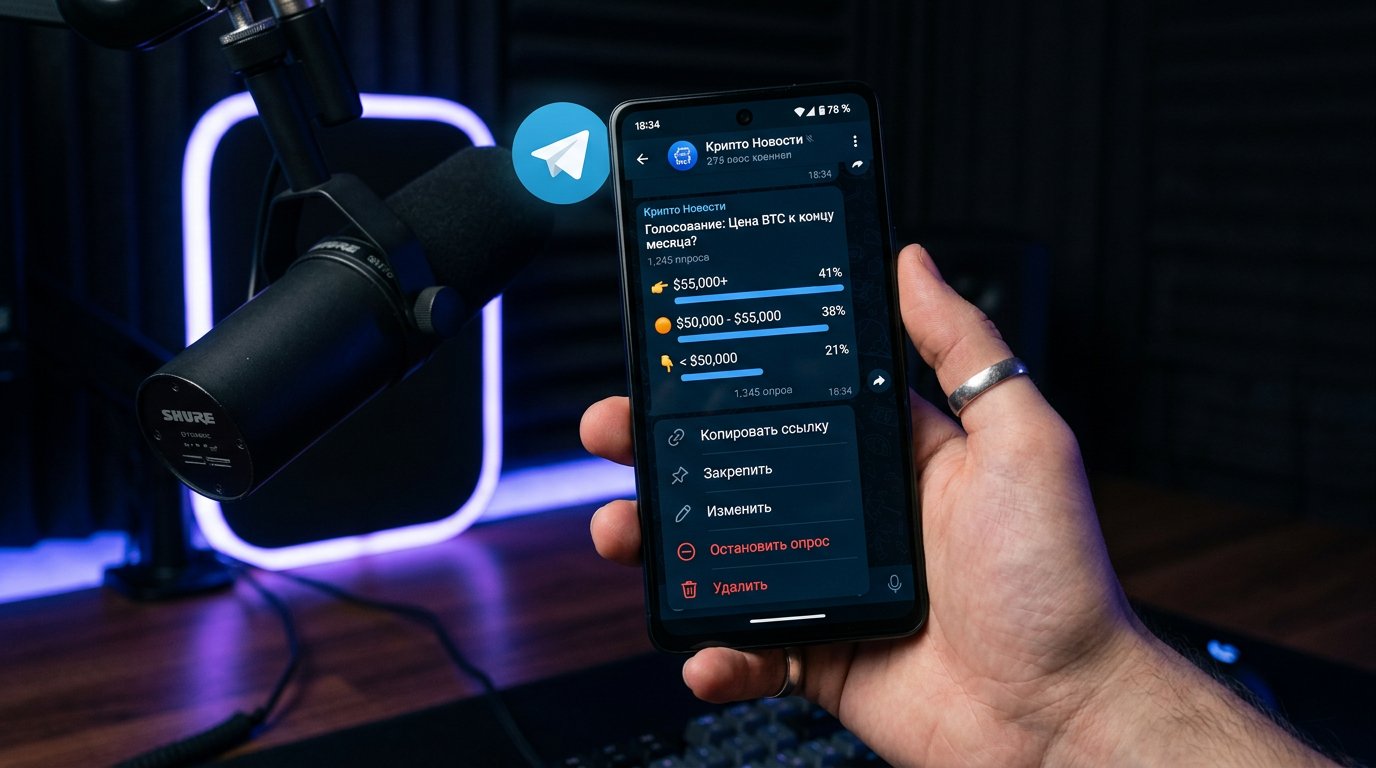
Open the channel and find the original post with the poll. The steps are similar on Android and iPhone:
- Tap the message with the poll or press and hold it to open the action menu.
- Select "Stop Poll" or a similarly worded option.
- Confirm the stop if Telegram asks for confirmation.
After that, check the post: the answer options should no longer accept votes, and the results should remain in the message.
How to Close Voting on a Computer
In Telegram Desktop, open the channel, find the poll you need, and right-click on it. A "Stop Poll" command will appear in the context menu. If Telegram asks for confirmation, confirm the action.
Make sure you open the menu for the message with the poll itself, not a neighboring post. After stopping, the results will remain in the post, but voting from a computer or phone will no longer be possible.
Who Can Stop a Poll in a Channel
The channel owner or an administrator with the necessary permissions to manage posts can stop voting. A regular subscriber cannot close a public poll, even if they have already voted in it.
If an administrator doesn't have the stop command, the owner can check their permissions. It's also worth making sure you've opened the original poll in the channel, not a copy forwarded to another chat. Management of the original post must be done in the channel where it was published.
What Subscribers Will See After the Poll Is Stopped
The post will retain the question, answer options, and results as of the moment it was closed. Subscribers can view the vote distribution but will no longer be able to vote or change their answers after the poll is stopped.
Closing does not hide the results. If you need to keep the post without showing results, stopping the poll won't accomplish that. Keep this in mind before launching a vote.
How to Save Results Before Deleting
You can leave the results of a stopped poll in the channel or move them to a separate post. For example, a screenshot or text description will come in handy if you plan to delete the original post or need to discuss the results separately.
A screenshot has a drawback: it only shows data as of the moment it was taken. If the poll is still open, votes may come in later. For final results, it's best to take the screenshot after stopping the poll.
Close the Poll or Delete the Post
When you stop a poll, the message stays in the channel, so you can reference it from a follow-up post or leave it alongside the discussion. The downside is that the old poll will continue to take up space in the feed and show its results.
When you delete it, the poll post itself and its results disappear from the channel. This works for a mistaken or unnecessary message, but subscribers will no longer be able to open it to check the vote distribution.
What to Do If a Poll Was Closed by Mistake
You cannot restore voting in a stopped poll. You'll need to create a new poll and re-add the question with answer options. Old votes won't carry over automatically: participants will have to vote again.
It's best not to mix the results of the two posts without explanation: some of your audience may answer both. In the new message, you can state the reason for re-voting and the deadline for collecting responses. A link to the old poll will help explain why two similar posts appeared.
How to End a Poll at the Right Time
If timing matters, you can specify it in the post text and stop the poll after the response period ends. It's also best to indicate the time zone: your channel audience may be in different regions.
Manual closing lets you check the results right after stopping, but it requires the owner or an administrator to be present. If several administrators have access to the channel, agree in advance on who will end the vote.
Can a Poll Be Closed Automatically
For automation, you can explore the capabilities of bots or other tools through which the vote is launched. Their downside is the extra setup and dependence on a third-party solution.
Don't assume a bot can stop any already-published poll. You should verify that capability and the necessary permissions before launching. For an active poll, manually stopping it via the message menu remains the straightforward way to end response collection.
Why the Stop Command Doesn't Appear
First, check that you've opened the original post in the correct channel and that the account has permission to manage the post. If voting has already been stopped, the stop command won't be needed again.
Don't confuse a poll in a channel with a message in a linked discussion or a forwarded copy. If the vote was created through a third-party tool, how you manage it may depend on how it was launched.
What to Do If Stopping Didn't Work
If you selected the command but votes are still being accepted, check your network connection and the state of the post after reopening the channel. If necessary, update Telegram: the interface may differ in an older version.
After that, you can repeat the stop from the original message's menu. Until the closure is confirmed, results may change, so don't announce them as final ahead of time.
Last Articles
What has changed in design and functionality We have updated the website to make working with it faster and more convenient. The main changes affect ..
Good afternoon, I've collected all the news during this time.: 1. The main news is that prices for twitch viewers have been greatly reduced, while Tw..
1. Use promo code "December2025" for a 15% discount for all our viewers2. We have reduced the base prices for our configurator and the most affordable..
Twitch services are working stably, so we are ready to cooperate with squads, resellers, service owners, bot owners, and many others.Individual te..
We have completely updated our Twitch viewer services, and they are now working stably. We only use high-quality IP addresses for the viewers.The ..
Hello everyone! Today, we are announcing a new feature—"Twitch Viewer Configurator". Now, you can customize any plan for your Twitch channel. Choo..
Greetings, I have compiled a guide for streamers, which will be very relevant at the moment. Now YouTube and twitch have disabled monetization from vi..
We have finally developed the APINow it will be more convenient for our partner sites to work with us.To update the maximum tariffs for YouTube, an up..
Due to the huge popularity of the partnership services and referral program, we have made a cooperation table. The essence is very simple: more live a..
Our Services for Streamers








Our Services for Content Creators






