
How to Link Supplier Services to SMM Panel Cards via API
Why Separate the Supplier Catalog from the Panel Storefront
A supplier API usually returns a technical catalog: external ID, name, price, limits, status, and order parameters. In the SMM panel, the same item must fit into a structure that's clear to the client: platform, promotion type, geography, link format, audience quality, or launch speed.
If you display the external catalog without processing, the storefront will show technical names, duplicates, and unavailable items. Mapping separates purchasing logic from the client-facing card. One supplier service doesn't have to be a separate service in the panel.
What Data to Retrieve via API
Store the supplier's source data separately from the storefront settings. The external ID can't be replaced with the panel's internal identifier: it's needed for creating orders, retrieving status, canceling, and troubleshooting errors. It's also useful to store the last synchronization time and the full API response or a snapshot of it.
- Supplier identifier and external service ID.
- Name, description, and external category.
- Purchase price, currency, and billing unit.
- Minimum, maximum volume, and quantity step.
- Availability status, remaining stock, and temporary pause flag.
- Requirements for link, login, publication, comment, and geography.
- Flags for manual launch, cancellation, refill, and partial completion.
The downside of automatic import is that suppliers name the same fields differently and sometimes send incomplete data. The service name isn't suitable for a stable link: it can be changed without changing the external ID.
Example Service Catalog Request and Response
The API format depends on the supplier, but the logic is usually the same: the panel sends an access key and page parameters, and receives an array of services in response. For example, a catalog request with a cursor might look like this:
GET /api/services?cursor=eyJwYWdlIjoyfQ
A sample API response:
{ "services": [ { "id": "SP-1042", "name": "Global Followers", "platform": "twitch", "type": "followers", "price": "12.50", "min": 100, "max": 10000, "status": "active" } ], "next_cursor": "eyJwYWdlIjozfQ" }
You shouldn't write response fields directly into the storefront card. First they need to be validated, saved to the supplier catalog, and mapped to internal rules. The downside of working only with a ready-made card is that an import can overwrite the client-facing name, description, or manually selected category.
First Define the Category Structure in the Panel
Define the panel taxonomy before importing. The top level usually describes the platform, the next one describes the action: followers, views, reactions, comments, live stream viewers, or another format. Within that, you can split services by geography, audience type, speed, and compensation terms.
For each category, define the required attributes. For views, this might be the link type and content format; for followers, the platform, geography, and allowed profile type. The downside of an overly detailed structure is that the catalog becomes harder to maintain, and similar services start to differ only in internal nuances.
Store Supplier and Storefront Links Separately
The link between a supplier service and a panel card should be stored in a separate table or entity. It needs the supplier, external ID, internal card, category, price rule, route priority, publication status, and date of the last successful check.
This schema lets you replace a supplier without changing the card's URL and without losing order history. Example mapping row in JSON:
{ "supplier_id": "supplier_a", "external_service_id": "SP-1042", "panel_category": "twitch_followers", "showcase_card_id": "followers_global", "route_priority": 1, "status": "active" }
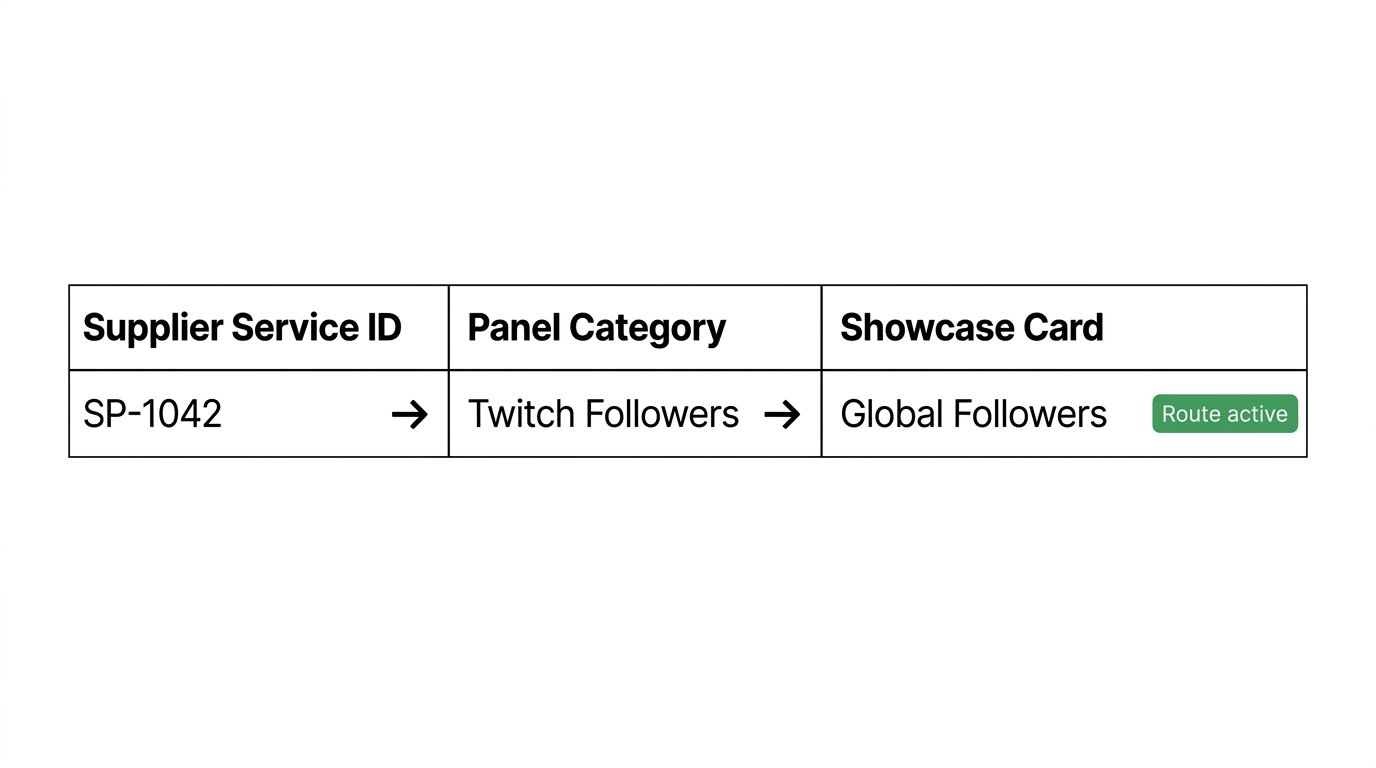
Links can take different forms, but define an update rule for each one in advance.
- One supplier service — one card, if it has unique parameters and order form.
- Multiple services from different suppliers — one card, if they're compatible in requirements and terms.
- One supplier service — multiple cards, if the storefront splits it by language, segment, or sales method.
Combining multiple suppliers into one card has a downside: speed, availability, and actual fulfillment terms may differ. Don't combine routes with different link formats, limits, or required fields.
Import the Catalog Page by Page
A supplier may return the catalog in pages via number, offset, or cursor. The first response doesn't necessarily contain all services. Request the next page until the API returns a cursor, a continuation link, or another explicit sign that more data exists.
With cursor-based pagination, processing works like this: the panel receives a page, saves all services, marks them as found in the current cycle, and only then moves to the next cursor. If the next_cursor field is absent, the traversal is considered complete.
- Create an identifier for the current synchronization cycle.
- Request the first page and save the retrieved services.
- For each service, update the last_seen_sync field with the cycle identifier.
- Save the next page cursor before making the next request.
- After successfully traversing all pages, compare the catalog against the current cycle.
The downside of sequential page loading is that a full import may take longer. Parallel requests speed up the process but increase the risk of hitting the API rate limit or getting pages in different catalog states.
Don't Create Duplicates on Re-Synchronization
To find an existing service, use a composite key: supplier identifier and external service ID. On each re-import, first look up the record by this pair, then update the technical fields. Create a new record only when this key is absent.
Don't use name, price, or category for deduplication. Two different services may share these values, and a supplier may rename an item without changing the external ID. For storefront links, you also need unique control: the same route shouldn't appear twice after a task is re-run.
It's useful to enforce uniqueness at the database level: supplier_id + external_service_id for the supplier catalog and supplier_id + external_service_id + showcase_card_id for mapping. The downside of a strict constraint is that if an old link has an error, you'll have to fix it explicitly rather than creating a new record on top of it.
How to Find Deleted and Missing Services
A service can only be considered missing after a fully successful traversal of all pages. If synchronization stopped due to an error, rate limit, or API unavailability, items absent from the already loaded part of the catalog can't be marked as deleted.
After a completed import, find this supplier's services whose last_seen_sync doesn't equal the current cycle identifier. Assign them the status "not found" or "archived", disable them for new orders, and send them for review. Keep the external ID, change history, and links to orders.
A disappeared service should be archived, not deleted. The supplier may return it to the catalog later, change the response filter, or temporarily hide the item. An archived link can be restored on the next import if the same external ID reappears.
What to Do When a Service's External ID Changes
If a supplier created a new service instead of the old one, the new external ID can't automatically be considered a continuation of the previous one. Even with the same name and price, the item's order requirements, geography, audience type, or compensation terms may have changed.
Move the old link to the archive, remove the route from sale, and keep it for old orders. Import the new service as a separate record. Then create a new mapping manually or by a safe rule if the technical parameters are fully compatible.
Automatic matching by name can speed things up, but its downside is the risk of sending an order to a different service with unsuitable terms. For ID changes, it's better to use a "needs review" status rather than silently swapping the route.
Configure Mapping by Stable Technical Fields
Automatic service assignment is best built on a set of fields: platform, service type, geography, link format, minimum volume, additional parameters, and status. For example, a service can fall into the geo views category if the API returns compatible values for platform, promotion type, and country.
If a supplier requires a comment, a list of profiles, or manual launch, don't publish the route in the standard order form. Use a separate card with the required fields or keep the service hidden until the integration is improved.
The name may be used only as an additional attribute. The downside of such a rule is that a supplier may change the wording, add an abbreviation, or use a different spelling. Tie critical routes to the external ID and verifiable response parameters.
Separate API Data from Card Settings
Import shouldn't fully overwrite the storefront card. Purchase price, limits, availability, and technical parameters are usually updated from the supplier. The client-facing name, description, visibility, display order, and markup rules remain internal panel settings.
Assign a source of truth for each field. For example, the minimum volume comes from the API, the client-facing name comes from the panel, and the storefront price is calculated by an internal rule based on the purchase cost. Without this separation, synchronization can erase a manually edited description or change the category based on the external name.
Check Price and Parameter Changes
If a supplier changed the price, recalculate the storefront price by the card's rule and check the currency, fees, and allowable margin. If the price is missing, the currency is unknown, or the terms have changed noticeably, it's better to move the route to a review status.
If the minimum, maximum, or quantity step changes, update the order form. If the form doesn't support the new constraints, remove the route from sale. Otherwise, the client will place an order that the supplier rejects after submission.
If the link format, required field, service type, or launch method has changed, block new orders until manual review. The downside of strict blocking is that some cards will temporarily disappear from the storefront, but that's safer than accepting incompatible orders.
Handle API Errors and Rate Limits
An error in a single request shouldn't automatically disable the entire catalog. Distinguish between authorization errors, invalid requests, temporary unavailability, and rate limits. Each group needs its own scenario.
- On an authorization error, stop new orders for this supplier and check access.
- On a request format error, save the API response and fix the integration without endless retries.
- On a temporary error, retry the request with an increasing delay.
- On a rate limit, save the current cursor and reschedule the task.
Don't mark services as missing until the deferred synchronization completes successfully. The downside of aggressive retries is that you can exhaust the rate limit faster and leave the catalog outdated for longer.
Keep Routes for Active Orders
Service status and order status are different entities. A service may disappear from the catalog for new clients, but old orders for it are still being fulfilled. Archiving a card or route shouldn't stop status polling for already created orders.
For each order, store the external service ID, external order ID, submitted parameters, purchase cost at launch time, and status history. If the supplier reports partial completion, cancellation, or an error, handle the situation according to the panel's rules: refund, compensation, refill, or manual review.
The downside of storing an order parameter snapshot is that it requires more space and a careful data schema. Without such a snapshot, it's impossible to determine on what terms an order was submitted if the supplier later changed the service.
Test Mapping Before Publishing Cards
After configuration, test the full path: creating an order in the panel, selecting a route, submitting to the supplier, saving the external ID, retrieving status, canceling, and handling partial completion. Test groups of services with different limits, links, and required fields.
Separately simulate a re-import, a price change, a service disappearing after a successful full traversal, an error in the middle of pagination, and a rate limit. This will show whether the panel archives working routes due to an incomplete catalog load.
Pay special attention to manual services and items with comments. Their downside is that the standard panel form often doesn't transmit all the data the supplier expects. They need a separate order template or a hidden status until the API integration is improved.
Last Articles
What has changed in design and functionality We have updated the website to make working with it faster and more convenient. The main changes affect ..
Good afternoon, I've collected all the news during this time.: 1. The main news is that prices for twitch viewers have been greatly reduced, while Tw..
1. Use promo code "December2025" for a 15% discount for all our viewers2. We have reduced the base prices for our configurator and the most affordable..
Twitch services are working stably, so we are ready to cooperate with squads, resellers, service owners, bot owners, and many others.Individual te..
We have completely updated our Twitch viewer services, and they are now working stably. We only use high-quality IP addresses for the viewers.The ..
Hello everyone! Today, we are announcing a new feature—"Twitch Viewer Configurator". Now, you can customize any plan for your Twitch channel. Choo..
Greetings, I have compiled a guide for streamers, which will be very relevant at the moment. Now YouTube and twitch have disabled monetization from vi..
We have finally developed the APINow it will be more convenient for our partner sites to work with us.To update the maximum tariffs for YouTube, an up..
Due to the huge popularity of the partnership services and referral program, we have made a cooperation table. The essence is very simple: more live a..
Our Services for Streamers








Our Services for Content Creators






