
How to run a Minecraft stream with subscribers without turning the server into chaos
First, define the goal of the stream with subscribers
A stream with subscribers can be a shared survival, a city build, a mini-game, a PvP event or a playthrough of a prepared map. If the format isn't chosen in advance, participants start playing their own separate games: some gather resources, others demand a teleport, others build at spawn, and someone checks whether they can kill their neighbors.
One goal simplifies the rules, the map, the player limit and the work of moderators. A participant should understand within a few minutes where to go, what to do and which actions are forbidden. The less you have to explain during the broadcast, the calmer the session goes.
Choose a format and define its boundaries
- Shared survival suits regular broadcasts and a consistent roster. The downside is that the world quickly fills up with unfinished builds, mines and random bases.
- A city build gives a shared task and a reason to show players' work. The downside is that you need districts, a building plan and control over shared resources.
- A short event on a ready-made map is easier to control. The downside is that preparing the map, mechanics and route takes time before the stream.
- Mini-games and PvP engage new viewers quickly. The downside is that there will be more complaints about teams, unfair alliances and disputed kills.
- Time-limited survival creates pace. The downside is that viewers who arrive later may not have time to join the game.
For the first mass launch, it's better to choose a short session with a clear finale: build one object, complete a route, defend a base or run several rounds of a mini-game. A long open survival is harder to moderate, especially if the audience doesn't know the rules yet.
Run the first mass launch on a separate map
Don't open the main world where there's already a base, an economy or builds by regular players. A mass influx changes both the load and the audience's behavior: some people come to play by the rules, some come to test the boundaries of what's allowed.
A test map lets you check entry, respawn points, permissions, region protection, commands and rollback of changes. If something breaks, the world can be restored or replaced without losing long-term progress. The downside of a temporary map is that not all regular participants will want to invest in a result that won't be saved.
Don't promise to keep the map after the broadcast if you don't plan to maintain it further. It's better to state right away that this is a one-time event, or separately specify which builds and inventories will remain until the next stream.
Restrict entry before the broadcast starts
An open server address in the description attracts not only subscribers. Random players, bots, people with someone else's nicknames and those deliberately looking for weak spots in the protection may join. For a stream, it's more convenient to collect applications in advance, use a whitelist or grant access through a role in the community.
The main downside of a whitelist is that new viewers won't be able to join instantly. But the team controls the flow, doesn't add people during lag and can verify nicknames before the start.
- Collect nicknames in advance and ask participants to check the spelling.
- In a single message, specify the game version, required mods, start time and entry rules.
- Set a deadline for closing applications and don't change it mid-broadcast unless necessary.
- Prepare a backup list in case some of those who signed up don't show up.
- Don't publish connection details until the moderators and the map are ready.
Set the player limit after a load test
The limit can't be chosen based on channel size or the number of applications. The load comes from generating new chunks, render distance, entities, farms, mobs, mechanisms, mods and player actions. A group that simultaneously runs off to explore the map can load the server harder than a larger number of participants on a pre-prepared arena.
First, run a closed test with a number of people close to the planned limit. Ask them to join at the same time, move in different directions, open chests, fight, build, use redstone and voice chat if it's connected to the server. Separately test the moment of a mass teleport to the gathering point: that's often what creates a sharp spike in load.
How to choose a starting limit
Start with the number of participants the server handled in the test without noticeable delays, and leave a margin. If everything ran at the limit during the test run, don't set the same limit for the stream: real viewers will be more active, will start going beyond the route and create unpredictable situations.
- For a building event, limit the world size or prepare the necessary chunks in advance so participants don't generate territory during the broadcast.
- For PvP, keep players within the arena and don't let them scatter across the map.
- For survival, reduce render and simulation distance to a value at which the test runs stably.
- Limit the number of mobs, items on the ground and allowed mechanisms if the format doesn't require a large number of them.
- Leave a few slots free: they'll come in handy for a moderator, a technician or a replacement for a player who drops out.
The downside of a hard limit is that some viewers will be left in the queue. Don't hide this: explain in advance whether there will be an additional intake, a next round or a separate stream for those who didn't get in.
Set up spawn as a point for managing players
A player who appears in an empty field starts looking for something to do on their own. Sometimes it's chopping wood, and sometimes it's a fight, a trap or an attempt to break an important build. Spawn should direct a person into the stream's scenario within the first minutes.
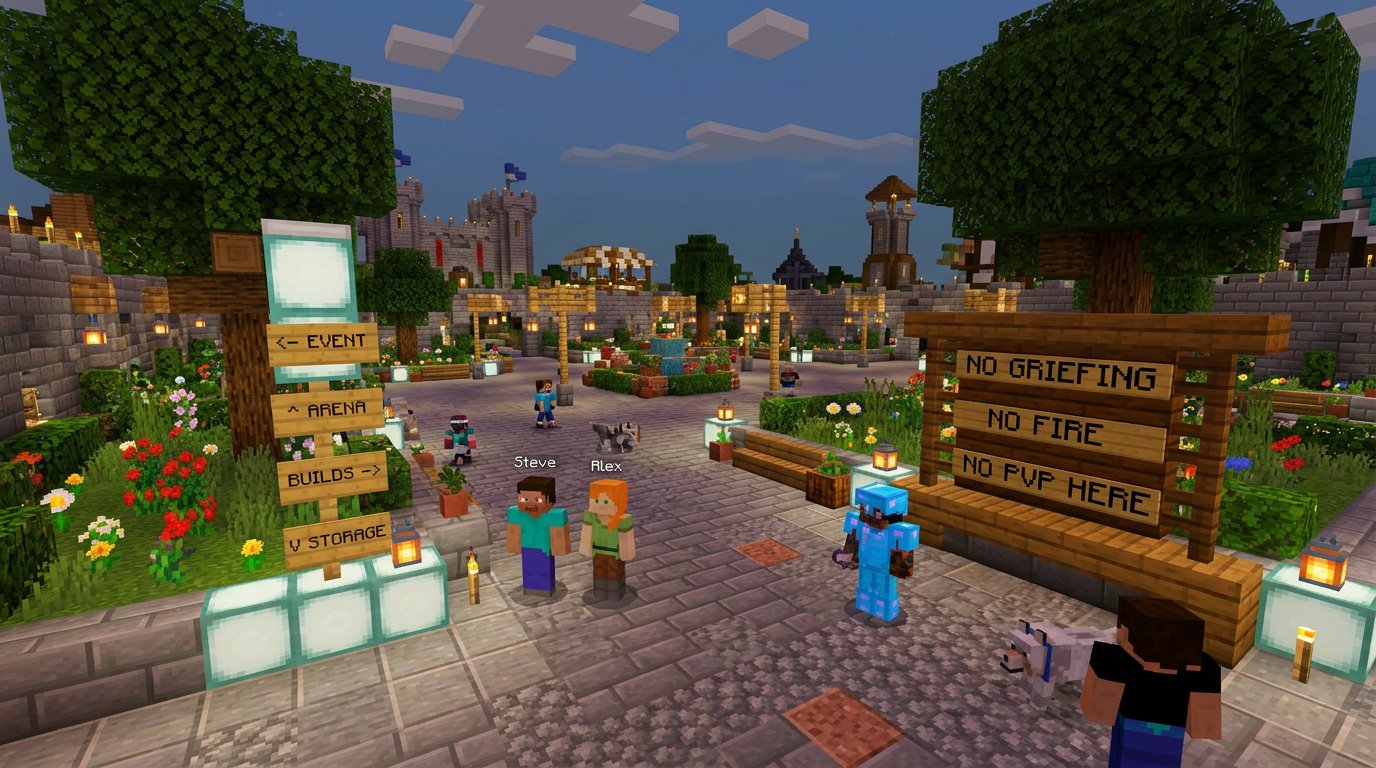
Make the spawn point protected from destruction, fire, explosions and PvP. Remove lava, height, mobs, open chests and passages to technical areas nearby. If a participant dies, they should return to a safe place, not end up in a crowd, a trap or a closed corridor.
What to place at spawn before opening the server
- A large sign or stand with the goal of the current stream: for example, build a district, complete an event or gather at the arena.
- Short rules in a few points: no griefing, fire, PvP outside the arena, cheats or flooding.
- Signs pointing to the arena, building zone, storage, gathering point and the exit from spawn.
- Visual boundaries of zones: paths, fences, different blocks, gates or color markers.
- A separate teleport point to the shared gathering so you don't have to lead latecomers manually across the whole map.
- A sign with a command or a way to contact a moderator in case of a problem.
- A small waiting area for those who joined before the start or are waiting for the next round.
It's better to pin the full regulations in the community, the stream description or a separate message. At spawn, leave only the rules that need to be seen immediately. The downside of a large number of signs is simple: players stop reading them after just a few seconds.
Write rules that can be enforced
The phrase “behave adequately” helps neither the participant nor the moderator. Rules should describe specific actions: whether you can attack other players, take things from chests, settle next to someone else's base, use explosives, build farms and use modifications.
For each important prohibition, specify the boundaries. PvP may be allowed in the arena but forbidden at spawn and in the building district. A shared storage may be accessible during a stage, but personal chests may not. The more precise the wording, the fewer disputes in the game chat.
- Don't break other people's builds, mechanisms or personal chests.
- Don't build traps, don't interfere with the event and don't block players.
- Don't use game bugs, item duplication, cheats or forbidden modifications.
- Don't create farms, mechanisms or mob clusters that cause lag.
- Don't flood, don't insult participants, don't publish personal data and don't advertise third-party projects.
- Don't argue about a punishment in the general chat: a complaint can be passed to a moderator after the decision.
The rules should be in a pinned message before the stream, in the broadcast description and in a short form at spawn. The downside of several locations is that the text will have to be updated everywhere if you change a condition before the broadcast.
Establish the punishment procedure in advance
Players should understand not only the prohibitions but also the consequences. For ordinary violations, a sequence works: a warning, a temporary restriction of actions or isolation, removal from the current session, a block on access. For cheats, deliberate griefing, evading a block and publishing personal data, a strict measure can be applied immediately.
The moderator records the nickname, time, place and reason for the decision. This is useful if the violator comes back with a complaint after the stream or if several moderators work in shifts. The downside of this scheme is that it requires discipline: you can't issue sanctions verbally and hope the team remembers everything.
Don't turn punishment into a vote with the chat. Viewers rarely see the whole situation, and the violator gets extra attention. On air, it's enough to name the rule, report that the case is being passed to a moderator and return to the game.
Assign moderators by task
The host can't simultaneously play, read messages, react to donations, process applications, look for a griefer and check for lag. For a small stream with restricted access, you need at least two people besides the host: one monitors the server, the other monitors the chat and communication. If there are many participants, PvP or open survival, add another in-game moderator.
With a large roster, it's useful to appoint a senior moderator who makes disputed decisions. The downside of an expanded team is that actions may be uncoordinated. So define in advance who issues warnings, who can kick and block, and who has access to settings and backups.
The in-game moderator's work during the broadcast
- Check entry, the whitelist and connection problems.
- Watch spawn, the arena, shared storages and important builds.
- Accept a complaint with the nickname, coordinates and approximate time of the violation.
- First stop the violation: teleport, restrict actions or remove the player from the zone.
- Check the change log and the context, then name the rule and apply the sanction.
- Record the decision in the team's work chat so another moderator understands the situation.
Give the host a clear stream scenario
Free play without stages quickly falls apart into dozens of unrelated actions. Participants don't have to constantly follow the host, but they need shared points where the server comes together. This can be the start, task assignment, an intermediate check-in, a vote, a final challenge and the wrap-up.
The downside of a strict schedule is that sometimes you'll have to interrupt an interesting build or round. But without time for stages, some players won't know that the event has already started or ended long ago.
Example scenario for a building stream
- First 10–15 minutes: the host shows spawn, the goal of the event, the boundaries of the building zone and briefly repeats the rules. The moderator checks the entry of the last participants.
- Next 15 minutes: a shared gathering at the site, distribution of districts and materials. Latecomers are directed to the teleport point rather than teleported manually one by one.
- Main stage: participants build in their zones, the host switches between works, comments on ideas and reminds about the time until the next gathering.
- 20–30 minutes before the finale: everyone gathers at the central square, shows finished objects and finishes dangerous work. Moderators close access to storages if the format provides for it.
- Final stage: a tour of the builds, a vote for the next project or a short shared challenge without destroying the map.
- Last 10 minutes: the host announces what will be saved after the stream, when the server will close and where to send suggestions or complaints.
Respond to conflicts without a public spectacle
On a server with subscribers, there will be disputes: who claimed a plot first, who took resources, whether a hit was accidental, who broke a block. Don't require the host to decide on every message. On a live broadcast, it's easy to make a mistake under pressure from the chat.
For a complaint, ask for the nickname, place, approximate time and a brief description of the situation. The in-game moderator checks the available data, announces the decision and, if necessary, compensates for the damage according to internal rules. If there's no evidence, that also needs to be said directly. The downside of this approach is that the affected player may remain dissatisfied, especially if they lost rare items.
If a conflict ends up on camera, name the rule, ask the participants to disperse and pass the situation to a moderator. Don't retell personal messages and don't argue with the violator in voice chat. In case of a serious violation, the player can be removed from the server without a long explanation to the viewers.
Prepare actions for lag and crashes
If the server starts to slow down, stop new players from joining, announce a technical pause and save the world. Don't try to simultaneously run the event, find the cause and answer chat questions. The technical part should be handled by the person who was given access and the task in advance.
- Check before the stream how a backup is created and how to restore the world.
- Prepare a short message for the chat about the pause and the order of further actions.
- Decide in advance at which problem the round is canceled, postponed or restarted.
- Don't roll back the world silently if players have already lost progress.
- Keep a backup stage: a tour of builds, a conversation with the chat, a vote or a prepared mini-game.
The backup scenario may not be needed, and that's its downside: preparing it takes time. But without it, a technical pause turns into an empty broadcast, and participants don't understand whether to wait to return to the server.
Close the server and record the state of the world
After the stream, the server shouldn't be left uncontrolled just because viewers want to keep playing. If the format is designed for the broadcast, close entry, save the world and create a backup. Otherwise, by the next broadcast there may be new builds, conflicts and damage that no one saw.
After the event, write down which rules had to be repeated, where queues arose, which actions caused lag and how much time the team spent on moderation. On the next launch, this will help adjust the limit, spawn and scenario instead of sorting out the same problems all over again.
If the map will continue to live between broadcasts, separately state whether inventories, territories, participant access and shared resources are preserved. A temporary world has a downside: players are sorry to lose their result. But it's more honest than creating the expectation of a permanent server without the willingness to maintain it.
Last Articles
What has changed in design and functionality We have updated the website to make working with it faster and more convenient. The main changes affect ..
Good afternoon, I've collected all the news during this time.: 1. The main news is that prices for twitch viewers have been greatly reduced, while Tw..
1. Use promo code "December2025" for a 15% discount for all our viewers2. We have reduced the base prices for our configurator and the most affordable..
Twitch services are working stably, so we are ready to cooperate with squads, resellers, service owners, bot owners, and many others.Individual te..
We have completely updated our Twitch viewer services, and they are now working stably. We only use high-quality IP addresses for the viewers.The ..
Hello everyone! Today, we are announcing a new feature—"Twitch Viewer Configurator". Now, you can customize any plan for your Twitch channel. Choo..
Greetings, I have compiled a guide for streamers, which will be very relevant at the moment. Now YouTube and twitch have disabled monetization from vi..
We have finally developed the APINow it will be more convenient for our partner sites to work with us.To update the maximum tariffs for YouTube, an up..
Due to the huge popularity of the partnership services and referral program, we have made a cooperation table. The essence is very simple: more live a..
Our Services for Streamers








Our Services for Content Creators






